The state of AI debugging in 2026
Debugging has always been a necessary evil for developers. Traditionally, it's been a painstaking process of stepping through code, examining variables, and relying on intuition. But modern codebases are exploding in complexity – microservices, sprawling frameworks, and the ever-present threat of subtle edge cases mean traditional methods are often insufficient. That’s where AI-powered debugging tools come in.
The initial hype around AI in coding focused heavily on code generation, but the real power is becoming clear in areas like error detection and root cause analysis. We’re past the point of expecting AI to write entire applications flawlessly. Instead, the focus has shifted to using AI to augment a developer’s skillset, making them more efficient and reducing the time spent on frustrating debugging sessions.
Early tools were brittle. By 2026, they've matured. These aren't replacements for developers; they are better instruments. Success depends on knowing which tool fits your specific stack. We've compared the top contenders based on their real-world utility.
Expectations have leveled out. The promise isn't a bug-free world, but a world where bugs are found faster, understood more easily, and fixed with less effort. The tools below represent the current state of that promise – a significant step forward, but still requiring a skilled human in the driver’s seat.
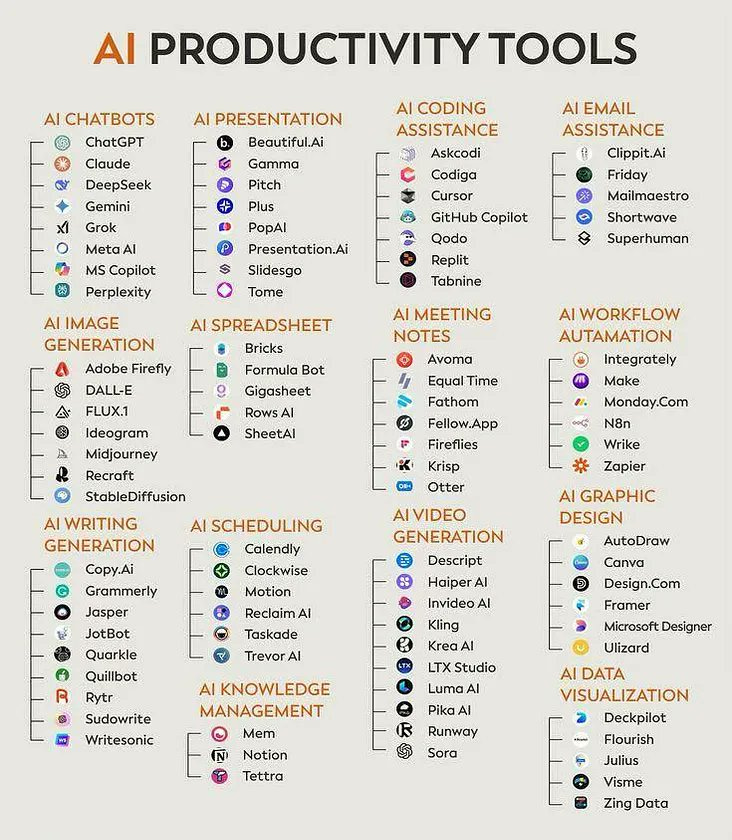
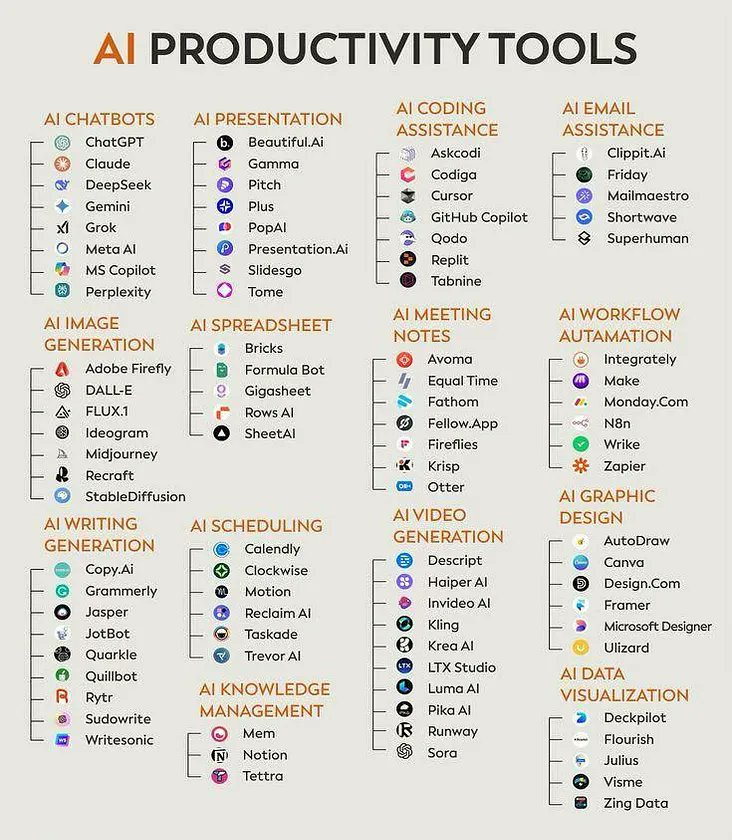
Ten tools worth using
The AI debugging tool market is surprisingly competitive. Here's a rundown of the top 10 tools as of late 2026, covering their key features and what makes them stand out. Prices are subject to change, of course, but this reflects the market as we see it now.
1. GitHub Copilot (with enhanced debugging features): Still a leader, Copilot’s debugging capabilities have matured significantly. It now offers more accurate error explanations and suggestions, and better integration with Visual Studio Code. It supports Python, JavaScript, TypeScript, Java, and Go. Pricing starts at $10/month.
2. Amazon CodeWhisperer: A strong contender, especially for teams heavily invested in the AWS ecosystem. CodeWhisperer excels at identifying security vulnerabilities and providing context-aware code suggestions. Supports Python, Java, JavaScript, C#, and TypeScript. Offers a free tier and a professional tier at $19/month.
3. Tabnine AI Code Assistant: Tabnine focuses on code completion and error prevention. It learns from your codebase to provide highly relevant suggestions. Supports a wide range of languages and IDEs. Offers both cloud and self-hosted options, with pricing starting at $12/month.
4. DeepCode (now part of Snyk): Now integrated into Snyk, DeepCode offers static analysis and vulnerability detection. It’s particularly strong at identifying complex security flaws. Supports Java, Python, JavaScript, and TypeScript. Pricing is based on Snyk’s tiered plans.
5. Codium AI (CodiumAI): CodiumAI takes a unique approach, focusing on generating test cases to uncover bugs. It’s particularly effective for identifying edge cases and ensuring code coverage. Supports Python and JavaScript. Starts at $8/month.
6. Replit Ghostwriter: Integrated directly into the Replit IDE, Ghostwriter provides AI-powered code completion, explanation, and debugging. Excellent for beginners and those working on collaborative projects. Pricing is bundled with Replit Core and Pro subscriptions.
7. JetBrains AI Assistant: Built directly into JetBrains IDEs (IntelliJ, PyCharm, etc.), this assistant offers intelligent code completion, refactoring suggestions, and debugging assistance. Supports Java, Python, Kotlin, and more. Pricing varies depending on the JetBrains IDE.
8. Visual Studio IntelliCode: Microsoft’s AI-powered coding assistant for Visual Studio. IntelliCode provides personalized code completion and suggestions based on your coding style. Supports C#, C++, JavaScript, and TypeScript. It's included with Visual Studio subscriptions.
9. Sourcery AI Code Review Tool: Focuses on automated code review and identifying code smells. Sourcery helps developers write cleaner, more maintainable code and catch potential bugs early in the development process. Supports Python. Pricing starts at $25/month.
10. AI Debugger: A newer tool gaining traction, AI Debugger boasts a focus on explainability, attempting to not only find bugs but explain why they occurred in a human-readable format. Supports Python and JavaScript, with more languages planned. Offers a free tier and a pro tier at $15/month.
Gear Up Your Debugging Station: Essential Tools for AI-Assisted Coding
![Perixx PERIBOARD-535BR [Firmware Updated] Wired Ergonomic Mechanical Keyboard - Full-Size - Low-Profile Brown Tactile Switches - NKRO Anti-Ghosting - Compatible with Windows and macOS](https://m.media-amazon.com/images/I/71d5v14gj8L._AC_UY654_QL65_.jpg)
Low-profile brown tactile mechanical switches for a comfortable typing experience · Full-size layout with NKRO and anti-ghosting for accurate input · Ergonomic design to reduce strain during long coding sessions
This keyboard offers a comfortable and accurate typing experience, crucial for extended coding and debugging sessions.

Immersive 1000R curved 32-inch QHD display for a wide field of view · 165Hz refresh rate and 1ms response time for smooth visuals · HDR10 support and FreeSync Premium for enhanced picture quality and tear-free gaming
Experience your code and development environment with stunning clarity and fluid motion on this high-performance gaming monitor.

Hybrid Active Noise Cancelling to block out distractions · 40-hour playtime with ANC on for uninterrupted work · Hi-Res Audio and customizable EQ via app for immersive sound
These headphones help you maintain focus by eliminating background noise, allowing for deeper concentration on complex debugging tasks.

Vertical ergonomic design to reduce wrist strain · Multi-device connectivity for seamless switching between computers · Adjustable DPI settings for precise cursor control
This mouse promotes a healthier and more comfortable workflow, reducing fatigue during long hours of coding and debugging.
As an Amazon Associate I earn from qualifying purchases. Prices may vary.
Copilot vs. CodeWhisperer
GitHub Copilot and Amazon CodeWhisperer are the heavy hitters, but they have different priorities. Copilot uses OpenAI’s models and acts like a partner that suggests code as you type. CodeWhisperer is more of a specialized auditor, focusing on fixing existing errors and catching security vulnerabilities.
In terms of code suggestion accuracy, both tools are impressive, but Copilot often excels in generating more complete and contextually relevant code blocks. CodeWhisperer is particularly strong at suggesting fixes for known security flaws, drawing on Amazon’s extensive security expertise. Error detection rates are comparable, although CodeWhisperer tends to flag more potential issues, sometimes resulting in more false positives.
Integration is a key differentiator. Copilot is deeply integrated with Visual Studio Code, making it a natural choice for developers already using that IDE. CodeWhisperer integrates seamlessly with AWS Cloud9 and other AWS services. Both now have extensions for other popular IDEs, but the native integration still provides a smoother experience.
Consider a scenario where you’re debugging a Python application with a memory leak. Copilot might suggest alternative data structures or algorithms to optimize memory usage. CodeWhisperer, however, might flag the specific line of code causing the leak and offer a direct fix. Both tools can explain the code, but Copilot’s explanations tend to be more conversational, while CodeWhisperer’s are more technical.
Both tools perform well across common languages like Python and JavaScript. However, Copilot currently has a slight edge in Java and Go, while CodeWhisperer shines with C# and AWS-specific SDKs.
Rising stars
While Copilot and CodeWhisperer dominate the headlines, several other AI debugging tools are making significant strides. CodiumAI stands out with its focus on automated test case generation. It’s not just about finding bugs; it's about systematically proving their absence, which is a powerful approach to building robust software.
Sourcery AI Code Review Tool takes a different tack, concentrating on code quality and maintainability. It identifies code smells and suggests refactorings, helping developers write cleaner, less error-prone code. This preventative approach can significantly reduce the number of bugs that make it into production.
AI Debugger, as mentioned, is worth watching. Its emphasis on explainability is a refreshing change. Many AI tools simply flag errors without providing a clear understanding of why they occurred. AI Debugger aims to bridge that gap, making it easier for developers to learn from their mistakes. Its current language support is limited, but the roadmap is ambitious.
These tools often target niche areas or offer unique approaches that the larger players haven’t yet addressed. They’re a good option for developers looking for specialized solutions or those who want to experiment with cutting-edge AI technology. Their pricing models are often more flexible, making them accessible to individual developers and small teams.
AI-Powered Debugging Tools Comparison - 2026
| Tool | Key Feature | Target Language(s) | IDE Integration | Unique Advantage |
|---|---|---|---|---|
| GitHub Copilot (with enhanced debugging features) | Code completion, bug detection, automated suggestions for fixes, explanation of code behavior | Wide range, including Python, JavaScript, TypeScript, Java, C#, C++ | VS Code, Visual Studio, Neovim, JetBrains IDEs | Strong context awareness and integration with existing workflows; continually evolving debugging capabilities. |
| Amazon CodeWhisperer | Real-time code suggestions, security vulnerability detection, code transformation | Python, Java, JavaScript, C#, TypeScript, Go, SQL | VS Code, IntelliJ IDEA, AWS Cloud9 | Strong security focus and integration with AWS ecosystem. |
| Tabnine AI Code Assistant | Deep code completion, full-function code snippets, cloud and local models | Python, JavaScript, Java, C++, C#, PHP, Go, Ruby, Kotlin | VS Code, IntelliJ IDEA, Sublime Text, Eclipse, Vim | Offers both cloud and locally hosted models for data privacy and control. |
| DeepCode (now part of Snyk) | Static code analysis, bug pattern detection, security vulnerability identification | JavaScript, Python, Java, C#, TypeScript, PHP | VS Code, IntelliJ IDEA, WebStorm, Visual Studio | Focus on identifying and preventing security vulnerabilities early in the development process. |
| CodiumAI (CodiumAI) | Automated test case generation, code review automation, AI-powered debugging | Python, JavaScript, Java, TypeScript | VS Code, IntelliJ IDEA | Specializes in generating comprehensive test cases to uncover hidden bugs. |
| Replit Ghostwriter | Code completion, code generation, explanation of code, debugging assistance | Supports many languages used on Replit platform | Replit IDE | Tight integration with the Replit collaborative development environment. |
| JetBrains AI Assistant | Code completion, code generation, refactoring suggestions, explanation of code | Kotlin, Java, Python, JavaScript, TypeScript, and others supported by JetBrains IDEs | JetBrains IDEs (IntelliJ IDEA, PyCharm, etc.) | Deep integration with JetBrains IDEs and understanding of their features. |
| Visual Studio IntelliCode | AI-assisted code completion, argument suggestions, member prediction | C#, C++, JavaScript, TypeScript, Python | Visual Studio, VS Code | Designed to enhance developer productivity within the Microsoft ecosystem. |
Illustrative comparison based on the article research brief. Verify current pricing, limits, and product details in the official docs before relying on it.
Production challenges
Deploying AI debugging tools into a production environment introduces a new set of challenges. Data privacy and security are paramount. You need to ensure that sensitive code and data are not exposed to third-party AI services. Self-hosted options, like Tabnine’s, can mitigate this risk, but they require more infrastructure and maintenance.
Explainability is also crucial. If an AI tool flags an issue in production, you need to understand why it did so. Black-box AI models can be difficult to trust in critical situations. AI Debugger’s focus on explainability is a step in the right direction.
According to Braintrust, a key aspect of debugging AI agents in production is an 'evaluation-first architecture' turning failures into permanent test cases. This emphasizes the need for robust observability and monitoring alongside AI-powered debugging. You need to be able to track the performance of your AI models, identify anomalies, and quickly diagnose and resolve issues.
The tools are adapting. Many now offer features like data anonymization and role-based access control. Integration with existing observability platforms is also becoming more common. However, it's still a relatively new field, and best practices are still evolving.
The human element
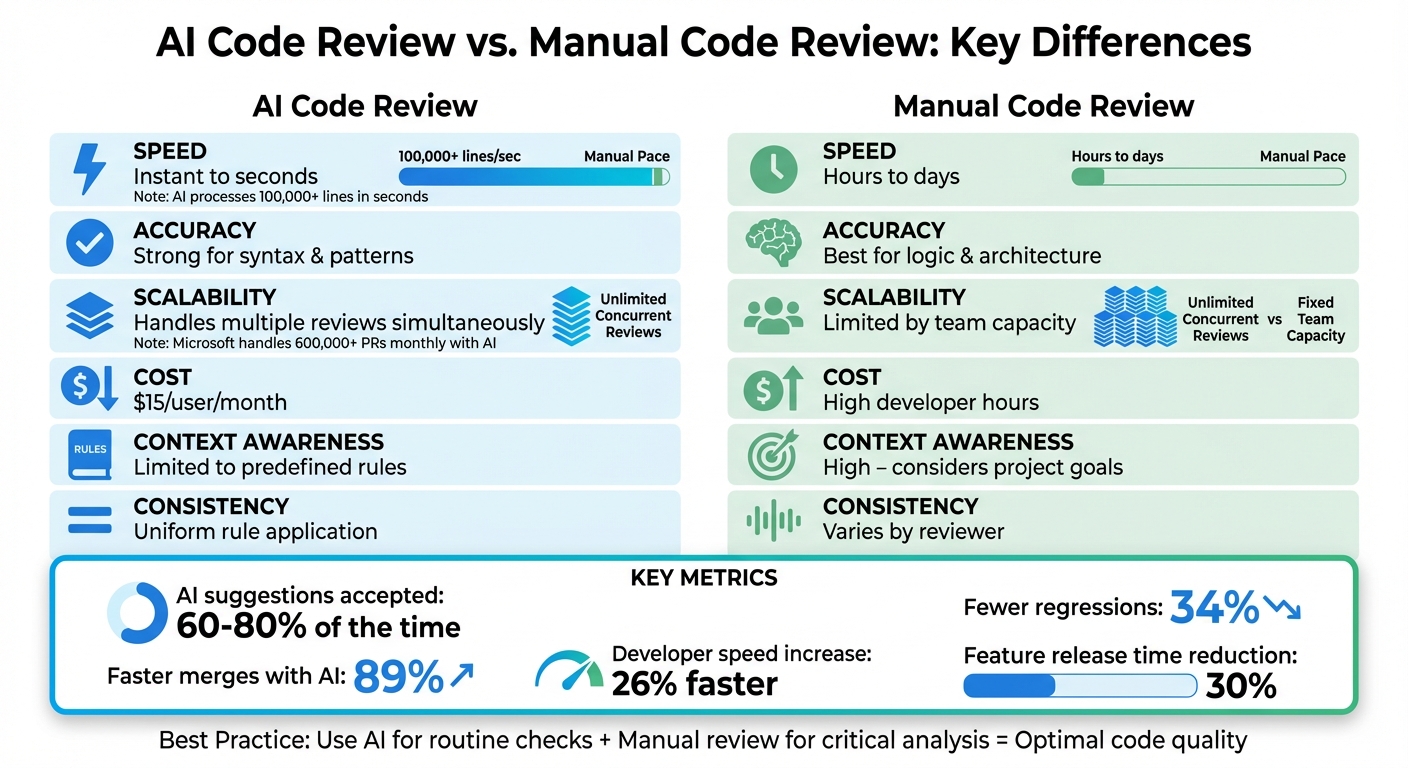
The fear that AI will replace developers is largely unfounded. As DeveloperWay reported in 2026, even with advanced AI tools, complex debugging still requires human intuition and problem-solving skills. AI excels at automating tedious tasks, such as identifying common errors and suggesting code completions, but it can’t replace the critical thinking needed to understand the underlying logic and design of a system.
AI debugging tools are best used as a complement to human expertise. They can free up developers to focus on more complex challenges, such as designing new features and architecting scalable systems. They can also help junior developers learn from their mistakes and improve their coding skills.
The most effective debugging workflows involve a combination of AI assistance and human oversight. Let the AI handle the repetitive tasks, but always review its suggestions and use your own judgment to make the final decision. Don't blindly trust the AI; treat it as a powerful assistant, not an infallible oracle.
The role of the developer is evolving, but it's not disappearing. In fact, the demand for skilled developers is likely to increase as AI tools become more prevalent. Developers who can effectively leverage these tools will be highly valued in the years to come.

No comments yet. Be the first to share your thoughts!