The rise of AI debugging
Debugging is a core, often frustrating, part of software development. With complex applications, microservices, and cloud infrastructure, finding and fixing bugs gets harder. Manual inspection, logging, and breakpoints aren't enough for modern development speeds.
Developers spend about 50% of their time on debugging, rework, and testing, according to Evans Data Corporation in 2023. This slows productivity and delays projects. Manual debugging also leads to missed bugs and security risks.
AI is a powerful ally against bugs. AI debugging tools automate tedious, error-prone tasks. They use machine learning to analyze code, find patterns, predict errors, and suggest fixes. This augments developer abilities, letting them focus on complex problem-solving.
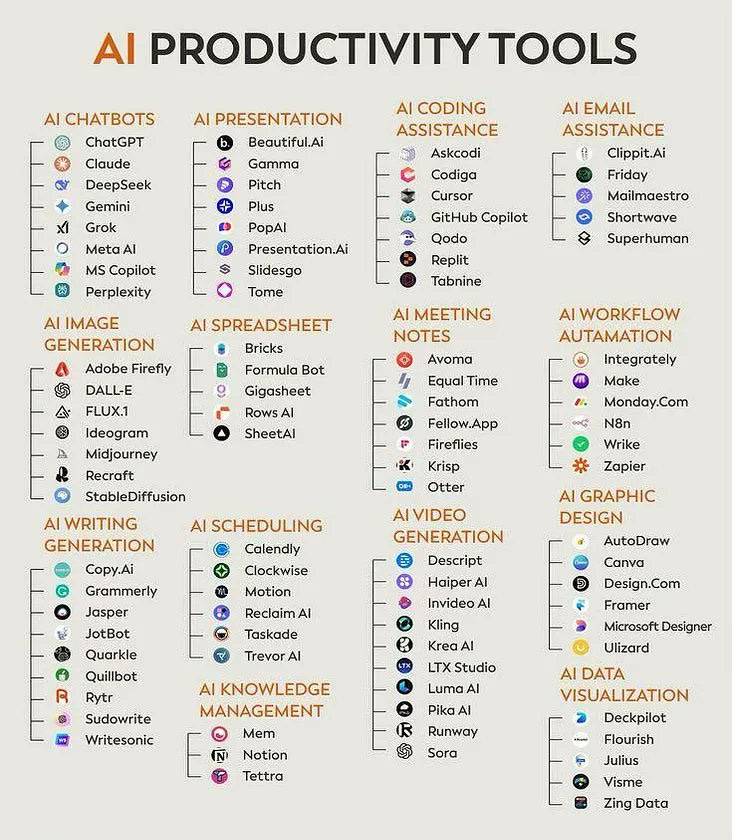
Top 10 AI Debugging Tools (2026)
The market for AI-powered debugging tools is rapidly evolving. Here’s a look at ten leading options as of 2026, considering their AI features, supported languages, and overall capabilities. Pricing information, where available, is current as of late 2025, but is subject to change.
1. DeepCode (now Snyk Code): Snyk Code employs static analysis driven by AI to identify security vulnerabilities and code quality issues. It supports Java, Python, JavaScript, TypeScript, and C#, integrating directly into IDEs like VS Code and IntelliJ. Pricing starts at $50 per developer per month.
2. GitHub Copilot: Developed by GitHub and OpenAI, Copilot is an AI pair programmer that suggests code completions and can detect potential bugs in real-time. It excels in Python, JavaScript, TypeScript, Ruby, Go, C#, and C++. Copilot costs $10 per user per month.
3. Tabnine: Similar to Copilot, Tabnine offers AI-powered code completion and error prevention. It learns from your codebase to provide more accurate suggestions. Tabnine supports a wider range of languages, including Java, C++, PHP, and Rust. A free version is available, with paid plans starting at $12 per user per month.
4. SonarQube: This platform offers intelligent code quality and security analysis, using AI to identify bugs, vulnerabilities, and code smells. It supports over 30 languages, including Java, C#, Python, and JavaScript. SonarQube has both a free Community Edition and paid Developer and Enterprise editions.
5. CodeGuru (Amazon): Amazon CodeGuru provides ML-powered code reviews and performance profiling. It focuses on identifying critical issues and optimizing application performance. CodeGuru Review supports Java and Python, while CodeGuru Profiler supports Java, Python, and Node.js. Pricing is based on usage.
6. Codacy: Codacy automates code review with AI insights, identifying code style violations, security vulnerabilities, and potential bugs. It supports over 50 languages and integrates with popular version control systems. Pricing starts at $29 per user per month.
7. Embold: Embold uses AI-driven code analysis to predict bugs and vulnerabilities before they reach production. It focuses on identifying design flaws and code complexity issues. Embold supports Java, C#, and Python. Pricing is available upon request.
8. Veracode: Veracode offers AI-enhanced application security testing, including static analysis, dynamic analysis, and software composition analysis. It supports a wide range of languages and frameworks. Veracode's pricing is customized based on application size and complexity.
9. Checkmarx: Checkmarx specializes in AI-powered static application security testing (SAST), identifying vulnerabilities in source code. It supports over 80 languages and integrates with CI/CD pipelines. Pricing is available upon request.
10. PVS-Studio: PVS-Studio is a static analysis tool that uses machine learning to detect bugs and vulnerabilities in C, C++, and C# code. It focuses on identifying issues related to memory leaks, null pointer dereferences, and other common errors. Pricing is based on a floating license model.
- The ranking considers AI capabilities, features, language support, and industry recognition.
- Pricing information is current as of late 2025 and may be subject to change. Always verify pricing on the vendor’s website.
- Many tools offer free trials or community editions, allowing you to evaluate their capabilities before committing to a paid plan.
AI-Powered Debugging Tools: A Comparative Analysis (2026)
| Tool | Supported Languages | Primary AI Feature | Integration Options | Ease of Use |
|---|---|---|---|---|
| DeepCode (now Snyk Code) | Wide range, including Java, Python, JavaScript | Static analysis, vulnerability detection | IDE plugins, CI/CD pipelines | Intermediate |
| GitHub Copilot | Extensive, excels in Python, JavaScript, TypeScript, Java | AI pair programming, code completion, bug suggestion | VS Code, JetBrains IDEs, Neovim | Intermediate |
| Tabnine | Broad support: Python, JavaScript, Java, C++, C# | AI code completion, error prevention | VS Code, IntelliJ, other major IDEs | Beginner |
| SonarQube | Over 30 languages, including Java, C#, Python, JavaScript | Code quality, security hotspots, bug pattern detection | CI/CD pipelines, IDE integrations | Intermediate to Advanced |
| CodeGuru (Amazon) | Java, Python, JavaScript, TypeScript | Code reviews, performance profiling, anomaly detection | AWS services, limited IDE integration | Advanced |
| Codacy | JavaScript, Python, Java, Ruby, PHP, C# | Automated code review, AI-driven insights | GitHub, GitLab, Bitbucket, CI/CD | Intermediate |
| Embold | Java, Python, JavaScript | AI-driven code analysis, bug prediction, code maintainability | IDE plugins, CI/CD integration | Intermediate |
| Veracode | Wide range, including Java, .NET, JavaScript, PHP | Application security testing, vulnerability analysis | CI/CD pipelines, API integrations | Advanced |
| Checkmarx | Multiple languages, specializing in Java, .NET, JavaScript | Static application security testing, vulnerability detection | CI/CD pipelines, IDE integrations | Advanced |
| PVS-Studio | C, C++, C# | Static analysis with machine learning, bug finding | Visual Studio, standalone analyzer, CI/CD | Intermediate |
Qualitative comparison based on the article research brief. Confirm current product details in the official docs before making implementation choices.
Essential AI Debugging Tools for Developers in 2026

Comprehensive coverage of static code analysis principles · Detailed explanations of various analysis techniques · Practical examples and case studies
This guide provides foundational knowledge essential for understanding the principles behind AI-powered static code analysis tools.

Explores GitHub Copilot's capabilities for code generation and completion · Details how Copilot integrates into the development workflow · Offers practical strategies for leveraging AI assistance in coding
GitHub Copilot represents a significant advancement in AI-assisted coding, directly impacting developer productivity and code quality, making it a key tool in modern debugging.
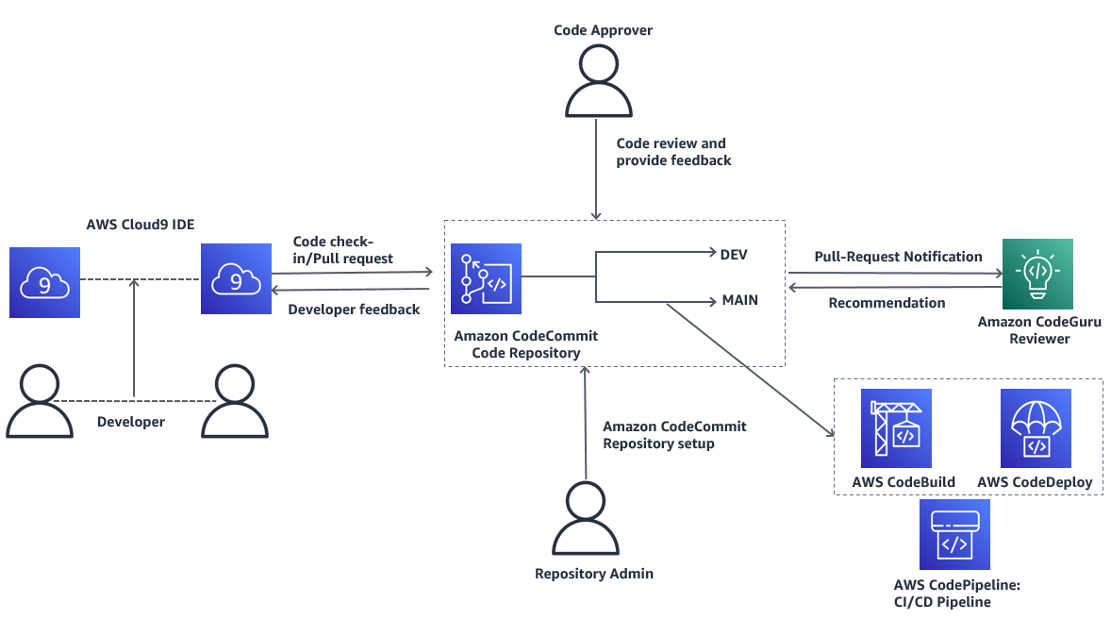
Automated code reviews powered by machine learning · Identification of performance issues and security vulnerabilities · Recommendations for code optimization
Amazon CodeGuru leverages machine learning to proactively identify code defects and security risks, offering intelligent insights for improved code quality and faster debugging.

Continuous code quality inspection · Detection of bugs, code smells, and security vulnerabilities · Integration with CI/CD pipelines for automated quality gates
SonarQube offers robust static analysis capabilities, providing comprehensive code quality and security insights that are crucial for effective automated bug detection.

Introduction to Tabnine's AI code completion · Guidance on improving coding speed and accuracy · Beginner-friendly approach to AI coding assistants
Tabnine is a leading AI coding assistant that enhances developer productivity by providing intelligent code completions, directly contributing to faster and more accurate code development.
As an Amazon Associate I earn from qualifying purchases. Prices may vary.
Deep Dive: Codeium & GitHub Copilot
GitHub Copilot and Codeium consistently rank among the most popular AI debugging tools, and for good reason. Both leverage large language models (LLMs) to provide real-time code suggestions and bug detection. However, their underlying architectures and approaches differ. Copilot, built on OpenAI’s Codex, draws from billions of lines of public code to understand code patterns and generate suggestions.
Codeium, on the other hand, is trained on a dataset of over 500 billion tokens of code, with a strong emphasis on open-source projects. This focus allows it to excel in generating accurate and context-aware code completions, particularly in languages like Python and Java. Both tools can identify potential bugs by recognizing common coding errors and suggesting alternative implementations.
A key strength of both Copilot and Codeium is their ability to learn from your codebase. As you use the tools, they adapt to your coding style and preferences, providing increasingly relevant suggestions. However, they are not without limitations. They can sometimes generate incorrect or insecure code, and they may struggle with complex or unconventional coding patterns. It’s crucial to always review the suggested code carefully before accepting it.
AI-Powered Static Analysis: Beyond Linting
Static analysis tools have long been used to identify potential bugs and vulnerabilities in code, but traditional tools often rely on predefined rules and patterns. AI-powered static analysis takes this approach to the next level by using machine learning to learn from codebases and identify more subtle and complex issues. These tools can detect anomalies, predict potential errors, and even suggest fixes.
The key difference lies in the ability to recognize patterns that traditional tools would miss. For example, an AI-powered static analyzer might identify a potential memory leak based on the way memory is allocated and deallocated in a function, even if there are no explicit errors in the code. This is achieved through techniques like data flow analysis and control flow analysis, combined with machine learning algorithms.
However, AI-powered static analysis is not a silver bullet. A common challenge is the occurrence of false positives – identifying issues that are not actually errors. Balancing the trade-off between false positives and missed errors is crucial. The best tools allow you to customize the analysis rules and prioritize the issues that are most important to your project. Tools like SonarQube and Snyk Code are leading the way in this area.
- Configure the tool to focus on your project's most critical issues.
- Regularly review reported issues and provide feedback to the tool.
- Integrate the tool into your CI/CD pipeline for automated analysis.
Debugging in Production: AI Observability
Traditional monitoring tools provide insights into application performance, but they often fall short when it comes to identifying the root causes of errors in production environments. AI observability takes a more proactive approach, using machine learning to automatically detect anomalies, identify patterns, and provide insights into application behavior. This is particularly important in distributed systems, where errors can be difficult to trace.
The difference between monitoring and observability is critical. Monitoring tells you that something is wrong; observability tells you why. AI-powered observability tools can analyze logs, metrics, and traces to identify the root causes of errors, even in complex microservices architectures. They can also predict potential issues before they impact users.
Tools like Airbrake and Memfault leverage AI to identify performance bottlenecks, memory leaks, and other issues that can impact application stability. They can also provide recommendations for resolving these issues. The ability to automatically correlate events and identify root causes is a game-changer for debugging in production.
The Future of AI Debugging
In the next 5-10 years, we can expect to see even more sophisticated AI-powered debugging tools. Advancements in machine learning, particularly in areas like natural language processing and reinforcement learning, will enable these tools to understand code more deeply and provide more accurate and insightful suggestions. We might see AI systems that can automatically fix bugs, generate unit tests, and even refactor code.
However, fully automating the debugging process is likely to remain a challenge. Debugging often requires a deep understanding of the application’s business logic and the context in which it operates. AI may be able to assist with many of the tedious tasks, but human developers will likely remain essential for solving complex and nuanced problems. The ethical implications of AI-powered debugging also need to be considered.
Potential biases in AI models could lead to the misdiagnosis of errors or the generation of insecure code. It’s crucial to ensure that these tools are developed and used responsibly, with a focus on fairness, transparency, and accountability. The impact on developer jobs is another concern. While AI is unlikely to replace developers entirely, it may automate some of their tasks, requiring them to adapt to new roles and responsibilities.
- Increased automation of bug detection and fixing.
- Better code understanding and analysis through NLP advancements.
- Greater focus on responsible AI development and ethical considerations.
Tools Worth a Closer Look
Beyond the top 10, several tools offer unique capabilities or show promising potential. Memfault stands out for its focus on debugging production systems, particularly in embedded environments. It provides real-time insights into memory usage, performance, and crashes. It’s not a general-purpose debugger, but it excels in its niche.
ReSharper, a Visual Studio extension, offers a powerful suite of code analysis and refactoring tools, enhanced by AI-powered suggestions. While it’s primarily focused on .NET development, it’s a valuable asset for any C# developer. It’s particularly strong at identifying code smells and suggesting improvements.
Finally, dbForge SQL Tools deserves mention for its ability to debug stored procedures and database code. It provides a visual debugger and a range of tools for optimizing SQL queries. While not strictly an AI-powered tool, it streamlines the debugging process for database developers.

No comments yet. Be the first to share your thoughts!