Rust and go debugging compared
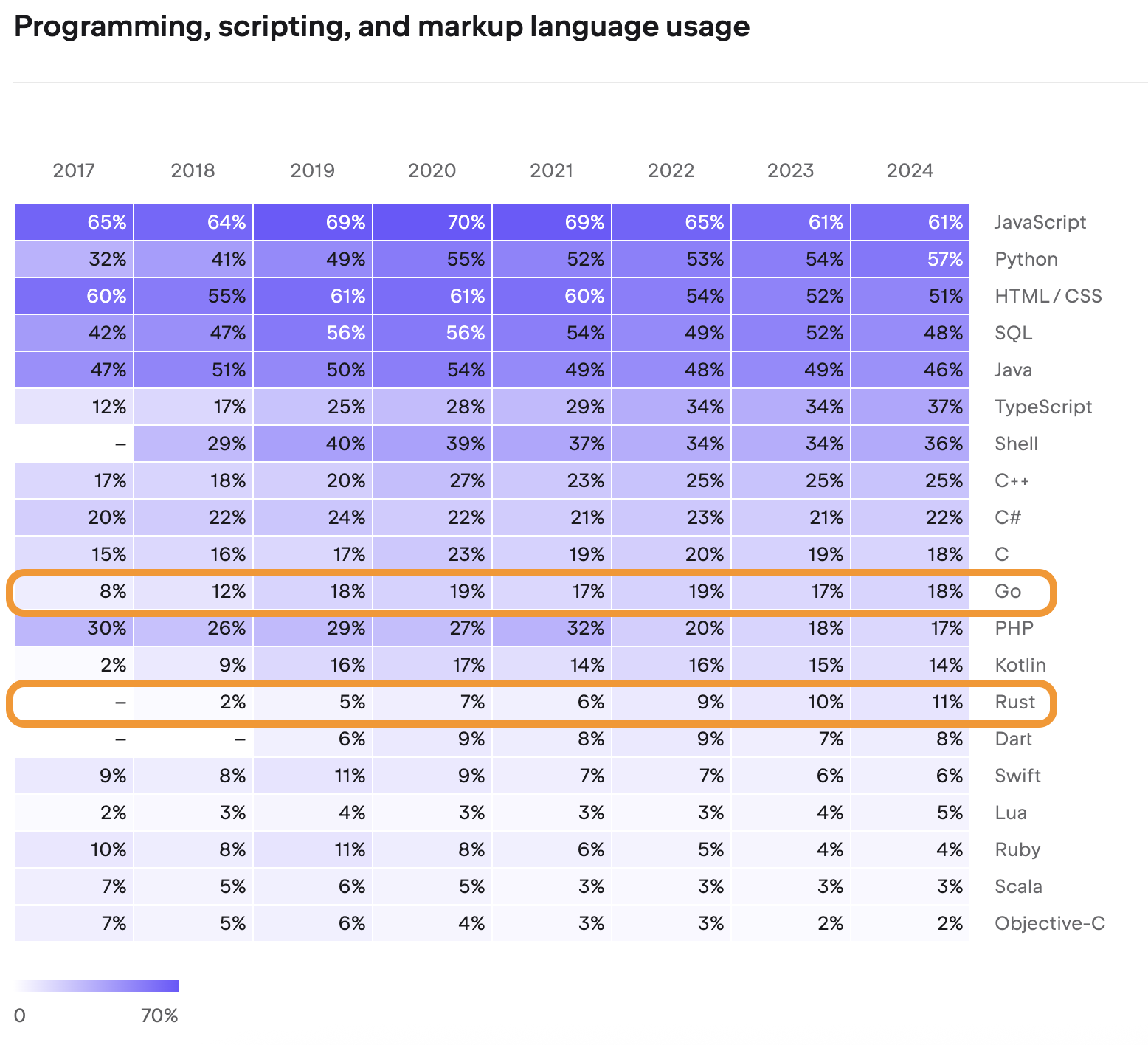
Rust and Go take different paths to systems programming. Rust focuses on memory safety and control, which adds complexity. Debugging here usually means wrestling with ownership and borrowing rules. Go is simpler. It uses garbage collection to manage memory, which generally makes for a faster debugging process.
Both languages are widely used: Rust in performance-critical applications like operating systems and game engines, and Go in cloud infrastructure, networking tools, and microservices. The differing design philosophies influence how developers approach debugging in each language. Rust’s debugging often requires a deeper understanding of the compiler and runtime, while Go’s debugging tends to be more focused on runtime behavior and concurrency.
The core challenge in both languages isn’t just finding bugs, but understanding why they occur. Rust's strong type system and borrow checker prevent many errors at compile time, but those that slip through can be complex to diagnose. Go’s simplicity can sometimes mask underlying issues, requiring careful examination of goroutines and channel interactions.
The rust toolchain
Rust offers a robust, though sometimes complex, debugging toolchain. The most common options are `gdb` (GNU Debugger) and `lldb` (Low Level Debugger). `lldb` is generally preferred on macOS and is becoming increasingly popular on Linux, while `gdb` has a longer history and wider availability. Both allow you to step through code, inspect variables, set breakpoints, and examine the call stack.
Visual Studio Code has excellent built-in debugging support for Rust, leveraging `lldb` under the hood. This integration provides a user-friendly interface for setting breakpoints, watching variables, and controlling program execution. However, configuring the debugger can sometimes be tricky, especially for complex projects or when dealing with conditional breakpoints.
A common technique, particularly for quick checks, is the strategic use of `println!` statements. While effective for simple debugging, this approach can become cumbersome and requires recompilation after each change. It’s also prone to leaving debugging statements in production code if not carefully removed. The Rust debugger itself is far more powerful, allowing for dynamic inspection without code modification.
Understanding Rust's ownership and borrowing rules is essential for effective debugging. Many errors stem from violations of these rules, and the debugger can help pinpoint exactly where these violations occur. Be prepared to spend time understanding the borrow checker’s output and how it relates to your code’s behavior.
- gdb: A classic debugger that works on almost any platform.
- lldb: Modern debugger, often preferred on macOS and gaining traction on Linux.
- VS Code Debugger: User-friendly interface built on top of lldb.
- `println!` statements: Quick but limited debugging technique.
Go's Built-in Debugging Features
Go’s debugging story is generally considered simpler than Rust’s. The `delve` debugger is the standard tool for debugging Go applications. It's easy to install and use, offering features like breakpoint setting, variable inspection, and step-by-step execution. `delve` also integrates well with popular IDEs like VS Code and GoLand.
Similar to Rust’s `println!` approach, Go developers frequently use `fmt.Println` for debugging. However, Go’s runtime provides more helpful information during crashes, including detailed stack traces and dumps of goroutine states. These features are invaluable for diagnosing issues in concurrent programs.
Go’s garbage collection simplifies memory-related debugging. Unlike Rust, you don’t need to worry about manual memory management or dangling pointers. However, you still need to be mindful of data races and synchronization issues when working with goroutines and channels. The `go vet` tool can help identify potential issues before runtime.
The simplicity of Go’s runtime and the effectiveness of `delve` make debugging a relatively straightforward process. The language's design encourages clear and concise code, which further reduces the likelihood of complex bugs.
How fast is the debugger?
Measuring the precise performance impact of debugging is difficult, as it depends heavily on hardware, debugger configuration, and the complexity of the code being debugged. However, anecdotal evidence suggests that debugging Rust code can be slower than debugging Go code, particularly when using `gdb`.
This difference is likely due to Rust’s more complex compilation process and the need to load more symbol information. The borrow checker also adds overhead during debugging, as the debugger needs to track ownership and borrowing rules. Go’s simpler runtime and garbage collection contribute to faster debugging performance.
Attaching a debugger inevitably introduces overhead, slowing down program execution. Stepping through code, inspecting variables, and setting breakpoints all consume processing time. The impact is generally more noticeable in Rust, where the compiler performs more optimizations and generates more complex machine code. Users have reported longer symbol loading times with Rust debuggers.
These are observations from daily use rather than a lab. While I haven't run a formal benchmark, Go debugging feels faster and uses fewer resources than the Rust equivalent.
Rust vs Go Debugging: Performance Comparison (Qualitative)
| Feature | Rust | Go |
|---|---|---|
| Symbol Loading | Moderate | Fast |
| Stepping | Moderate | Fast |
| Breakpoint Hit | Fast | Moderate |
| Overall Impression | Generally requires more configuration for optimal performance; debugging can be slower in complex scenarios. | Typically offers a faster, more straightforward debugging experience out-of-the-box. |
Illustrative comparison based on the article research brief. Verify current pricing, limits, and product details in the official docs before relying on it.
IDE choices for 2026
In 2026, Visual Studio Code is expected to remain the dominant IDE for both Rust and Go development. Its extensibility and strong debugging support make it a popular choice. The Rust Analyzer extension for VS Code is continually improving, providing features like code completion, linting, and debugging. We can anticipate further enhancements in breakpoint management and variable inspection.
IntelliJ IDEA, with its Rust and Go plugins, will likely continue to be a strong contender, particularly for developers who prefer a more feature-rich IDE. The Go plugin for IntelliJ IDEA already offers excellent debugging capabilities, and we can expect further improvements in 2026, potentially including better support for remote debugging and profiling.
Other IDEs, such as Neovim and Emacs, will also offer debugging support through plugins and integrations. However, the experience may not be as polished or feature-complete as in VS Code or IntelliJ IDEA. A key trend will be tighter integration between IDEs and remote debugging tools, allowing developers to debug applications running in cloud environments more easily.
By 2026, AI-assisted debugging features may become more prevalent in IDEs. These features could include automated bug detection, root cause analysis, and suggested fixes. While still in their early stages, AI-powered debugging tools have the potential to significantly improve developer productivity.
- VS Code: Dominant IDE with strong extension support (Rust Analyzer).
- IntelliJ IDEA: Feature-rich IDE with dedicated Rust and Go plugins.
- Neovim/Emacs: Customizable IDEs with plugin-based debugging support.
- AI-assisted debugging: A new trend that might help with productivity.
Featured Products

Integrated debugging tools · Extensive extension marketplace · Code navigation and refactoring
This IDE provides a comprehensive debugging environment with extensive customization options through extensions, facilitating efficient troubleshooting of complex codebases.

Advanced code analysis · Intelligent code completion · Built-in debugger
IntelliJ IDEA offers sophisticated debugging features and deep code understanding, enabling developers to pinpoint and resolve performance bottlenecks and errors effectively.
C/C++ debugging support · Cross-platform compatibility · Code analysis and refactoring
CLion provides powerful debugging tools specifically for C/C++ development, which is highly beneficial for analyzing and optimizing Rust applications due to their shared low-level capabilities.

Go-specific debugging tools · Intelligent code assistance for Go · Integration with Go build tools
GoLand is purpose-built for Go development, offering specialized debugging features and deep language understanding essential for efficient performance tuning and error resolution in Go projects.
As an Amazon Associate I earn from qualifying purchases. Prices may vary.
Debugging Common Errors: Rust vs. Go
Rust’s borrow checker is a frequent source of frustration for new developers. Debugging borrow checker errors often involves carefully examining the code to understand ownership and lifetime issues. The debugger can help pinpoint the exact location where the borrow checker detects a violation, but understanding the underlying concepts is crucial. For example, debugging a “cannot move out of borrowed content” error requires understanding why a variable is being borrowed and whether it's possible to move ownership.
Go’s common errors often revolve around concurrency and error handling. Nil pointer dereferences are a frequent cause of crashes, and the debugger can help identify the line of code where the dereference occurs. Race conditions, caused by concurrent access to shared resources, can be more difficult to debug. Go's runtime provides tools for detecting data races, but these tools can sometimes produce false positives. Using channels and mutexes correctly is essential to prevent race conditions.
Incorrect error handling is another common issue in Go. Failing to check errors returned by functions can lead to unexpected behavior. The debugger can help trace the execution flow and identify where errors are being ignored. Rust’s `Result` type forces developers to handle errors explicitly, reducing the likelihood of this issue.
Consider a scenario: in Rust, a mutable borrow conflict will halt compilation, and the error message will guide you to the conflicting borrows. In Go, a data race might only manifest intermittently, requiring careful use of the `-race` flag during testing and the debugger to catch the issue.
Community Insights: What Developers Say
Developers on the users.rust-lang.org forum frequently discuss the challenges of debugging Rust code. A common sentiment is that the borrow checker can be difficult to understand, particularly for beginners. However, many developers also acknowledge that it’s a powerful tool for preventing memory safety issues. There's broad agreement that `lldb` provides a superior debugging experience to `gdb` on macOS.
Many users also recommend learning to read the compiler's error messages carefully, as they often provide valuable clues about the root cause of the problem. Several developers suggest using the `cargo-expand` tool to see the expanded code generated by macros, which can help understand complex code paths. Many find the VS Code debugger with the Rust Analyzer extension to be the most user-friendly option.
Go developers generally report a more straightforward debugging experience. The `delve` debugger is praised for its simplicity and ease of use. However, some developers note that debugging concurrent programs can still be challenging, particularly when dealing with complex goroutine interactions.
You can find the original discussion thread here: Many contributors highlight the importance of understanding the underlying concepts of the language to effectively debug.

No comments yet. Be the first to share your thoughts!