The state of AI code review
AI is changing how we handle code reviews. What used to be a slow, manual bottleneck is now being handled by tools that scan for bugs and style issues in seconds. These services don't just find errors; they change the speed at which we can ship software.
These tools promise to identify bugs, security vulnerabilities, and style violations with greater efficiency than manual review alone. They aim to free up developers to focus on higher-level problem-solving and architectural design. However, the field is still nascent. The capabilities of these services are evolving quickly, and choosing the right tool requires careful consideration.
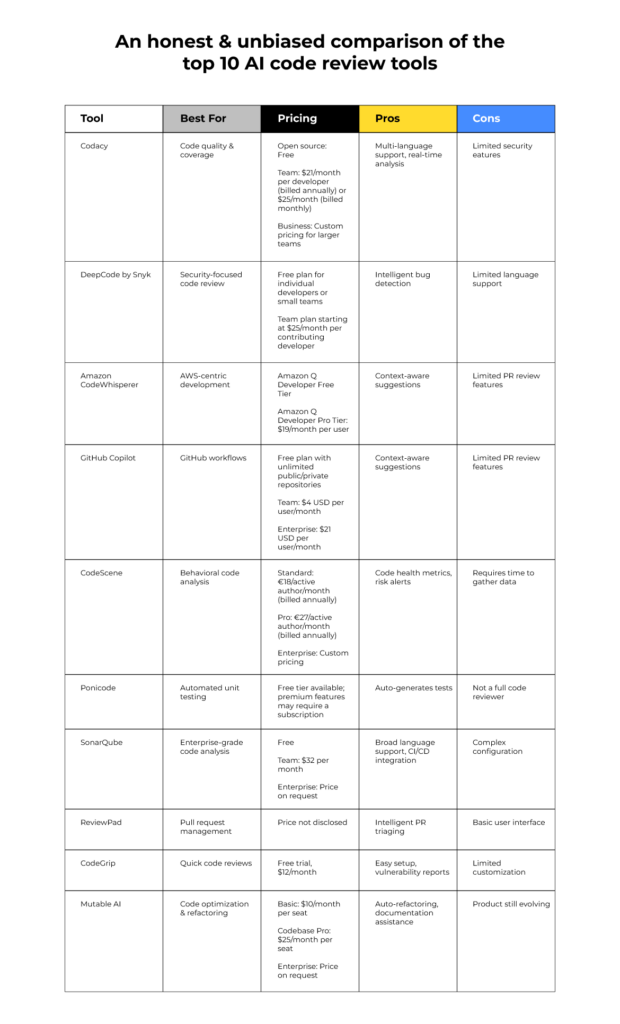
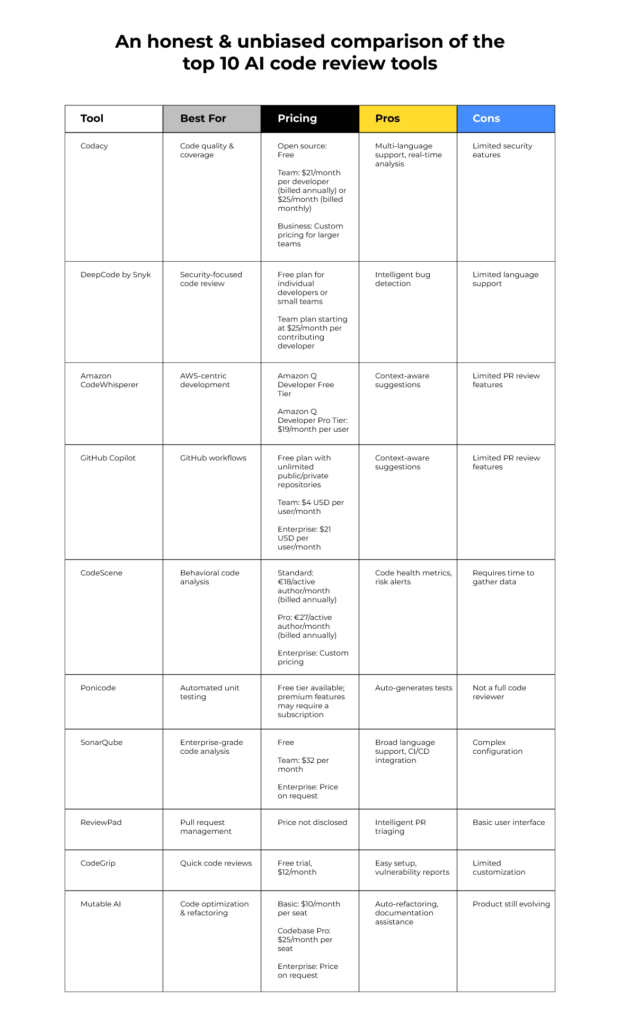
GitHub Copilot, AWS CodeWhisperer, and Cursor represent three prominent players in this space. Each takes a slightly different approach to AI-assisted coding, targeting different developer needs and workflows. This comparison, focused on the state of these tools in 2026, will provide a data-driven overview of their strengths, weaknesses, and ideal use cases.
Assessing these tools in 2026 is a logical point for evaluation. The initial hype surrounding AI code completion has begun to settle, allowing for a more realistic assessment of their practical value. Enough time has passed for these services to mature, accumulate user feedback, and refine their algorithms. This assessment will focus on utility, not just novelty.
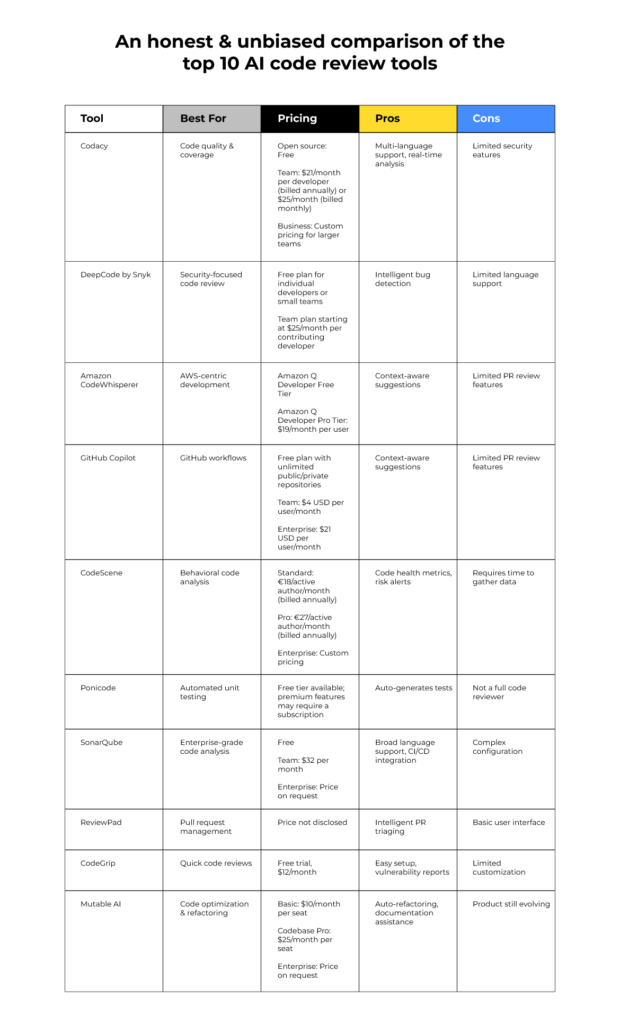
GitHub Copilot
GitHub Copilot, launched in 2021, quickly established itself as the leader in AI-assisted coding. Developed by GitHub in collaboration with OpenAI, Copilot leverages a massive dataset of public code repositories to provide context-aware code suggestions and autocompletion. Its core functionality centers around predicting and generating code snippets as a developer types.
Copilot's integration is a significant strength. It seamlessly integrates with popular IDEs including Visual Studio Code, Neovim, and JetBrains IDEs, becoming a natural extension of the development environment. This deep integration allows Copilot to understand the codebase and provide more relevant suggestions. It also offers explanations of generated code, which can be invaluable for understanding unfamiliar patterns.
User feedback on Copilot is mixed. Many developers praise its ability to accelerate development and reduce boilerplate code. Others criticize its tendency to generate insecure or incorrect code, requiring careful review. The quality of suggestions varies widely depending on the complexity of the task and the clarity of the code context. Copilot’s training data, while vast, is not without its biases and limitations.
Microsoft's backing provides Copilot with considerable resources for ongoing development and improvement. The service has undergone several iterations, with enhancements to its code generation capabilities and security features. However, the reliance on a subscription model, currently around $10 per month as of late 2026, can be a barrier to entry for some developers. Its history makes it the most well-known, but not necessarily the best.
Copilot is best at writing entire functions from a single comment. It saves a lot of time on boilerplate, but you still have to check the output. It isn't a replacement for knowing how to code; it's a way to avoid typing the same patterns over and over.
- Features: Autocompletion, code explanation, and function generation.
- IDE Integration: VS Code, Neovim, JetBrains IDEs.
- Pricing (Late 2026): Approximately $10/month subscription.
- Training Data: Public code repositories on GitHub.
AWS CodeWhisperer
AWS CodeWhisperer is Amazon’s entry into the AI code review and generation market. Positioned as a direct competitor to Copilot, CodeWhisperer distinguishes itself with a strong focus on security and integration with the AWS ecosystem. It offers both an individual tier and a professional tier, catering to different user needs.
A key feature of CodeWhisperer is its built-in security scanning. It can identify potential security vulnerabilities in code, such as SQL injection flaws and cross-site scripting vulnerabilities. It also provides license detection, alerting developers to potential copyright issues with open-source dependencies. This focus on security is particularly valuable for organizations operating in regulated industries.
CodeWhisperer’s integration is heavily geared towards AWS services. It works seamlessly with AWS CodeCommit, CodeBuild, and other AWS developer tools. While it also supports some popular IDEs, its integration is not as extensive as Copilot's. The professional tier, priced at $19 per user per month as of late 2026, unlocks features like administrative controls and enhanced security scanning.
One limitation of CodeWhisperer is its relative lack of support for languages outside of those commonly used in the AWS ecosystem. While it supports Python, Java, and JavaScript, its support for other languages is more limited. This can be a drawback for developers working on projects that don't heavily rely on AWS services.
CodeWhisperer’s ability to suggest code tailored to specific AWS APIs is a significant advantage for developers building applications on AWS. This can save time and reduce the risk of errors when working with complex AWS services. It is a strong contender if your workload is AWS-centric.
- Key Features: Code completion, security scans, open-source license detection, AWS API integration.
- Integrations: Works with AWS CodeCommit and CodeBuild, plus some standard IDEs.
- Pricing (Late 2026): Individual tier (free), Professional tier ($19/user/month).
- Training Data: Amazon’s internal code repositories and public code.
Cursor: an editor with AI at the center
Cursor takes a unique approach to AI-assisted coding. Unlike Copilot and CodeWhisperer, which are primarily extensions for existing IDEs, Cursor is a code editor built from the ground up with AI at its core. This allows for a more seamless and integrated AI experience.
Beyond basic code completion, Cursor offers features like chat-based debugging and refactoring. Developers can ask Cursor questions about their code and receive detailed explanations and suggestions. This conversational approach can be particularly helpful for understanding complex codebases or debugging challenging issues. It is designed to be a complete development environment, not just a code completion tool.
Cursor’s user interface and workflow are significantly different from traditional IDEs. It emphasizes a more fluid and interactive coding experience. However, this can also be a drawback for developers who are accustomed to the familiar layout of VS Code or other popular IDEs. The learning curve can be steeper.
Cursor relies heavily on OpenAI models, including GPT-4, for its AI capabilities. This means that its performance is directly tied to the quality and availability of these models. As of late 2026, pricing is tiered based on usage, with a free tier offering limited access and paid tiers providing more features and higher usage limits. Its focus is on developer productivity above all else.
The ability to quickly prototype and experiment with different coding approaches is a key strength of Cursor. Its AI-powered features can accelerate the development process and allow developers to explore new ideas more rapidly. It's a strong choice for those willing to adapt to a new way of working.
- Key Features: AI-powered code completion, chat-based debugging, refactoring, integrated code editor.
- IDE Integration: None – Cursor is the IDE.
- Pricing (Late 2026): Tiered based on usage, with a free tier and paid subscriptions.
- AI Model: OpenAI models (GPT-4).
Where each tool wins
Directly comparing these tools reveals distinct strengths. Code completion quality is generally highest with Copilot for widely-used languages like Python and JavaScript, benefiting from its extensive training data. CodeWhisperer is competitive within the AWS ecosystem, providing more relevant suggestions for AWS API calls. Cursor, while improving rapidly, sometimes struggles with complex codebases due to its reliance on OpenAI’s models.
Language support is broadest with Copilot, followed by CodeWhisperer. Cursor’s language support is adequate but not as comprehensive. Security vulnerability detection is a clear win for CodeWhisperer, with its built-in security scanning capabilities. Copilot and Cursor offer some security suggestions, but they are not as robust. Integration with existing workflows favors Copilot, due to its seamless integration with popular IDEs.
Ease of use is subjective, but Copilot generally has the lowest learning curve for developers already familiar with VS Code or other supported IDEs. Cursor requires a more significant shift in workflow. CodeWhisperer falls somewhere in between. Customizability is limited across all three tools, although Copilot offers some options for controlling the style of code suggestions.
Consider a scenario involving a complex data science project in Python. Copilot’s extensive training data and code completion capabilities would likely be most helpful for generating boilerplate code and suggesting common data manipulation techniques. For a backend application built on AWS, CodeWhisperer’s integration with AWS services and security scanning would be invaluable. For rapid prototyping and experimentation, Cursor’s chat-based debugging and refactoring features would shine.
AI Code Review Service Comparison - 2026
| Feature | GitHub Copilot | AWS CodeWhisperer | Cursor |
|---|---|---|---|
| Speed of Suggestions | Excellent - Generally very fast, particularly with common patterns. | Good - Responsive, but may exhibit slight delays in complex scenarios. | Good - Fast, optimized for a streamlined workflow within its environment. |
| Accuracy of Suggestions | Good - High accuracy for widely used languages and frameworks; can struggle with niche codebases. | Good - Strong accuracy, especially with AWS services; may require more context for non-AWS code. | Fair - Accuracy varies; benefits from user feedback and learning within a project. |
| Security Focus | Good - Includes vulnerability detection, but relies on user diligence for comprehensive security review. | Excellent - Designed with security as a core principle, offering robust vulnerability scanning and remediation suggestions. | Fair - Security features are present, but less emphasized compared to Copilot and CodeWhisperer. |
| IDE Integration | Excellent - Native integration with VS Code, Neovim, and JetBrains IDEs. | Good - Strong integration with VS Code, AWS Cloud9, and the AWS Toolkit for IDEs. | Excellent - Built as an IDE, providing seamless integration with its own environment. |
| AWS Integration | Limited - Basic support for AWS code snippets, but not deeply integrated. | Excellent - Deeply integrated with AWS services, providing tailored suggestions and best practices. | Limited - No specific AWS-focused features. |
| Customization Options | Good - Allows some customization through prompts and code comments. | Fair - Limited customization options; primarily focused on AWS-specific configurations. | Good - Offers customization through settings and user-defined snippets. |
| Ease of Learning | Good - Relatively easy to pick up for experienced developers, but requires understanding of prompting techniques. | Good - Straightforward to use, particularly for developers familiar with AWS. | Fair - Steeper learning curve due to its unique IDE and workflow. |
Qualitative comparison based on the article research brief. Confirm current product details in the official docs before making implementation choices.
Real-World Use Cases & Performance
In web development (JavaScript, React), Copilot consistently delivers strong performance, particularly for generating component code and handling common UI patterns. CodeWhisperer is less effective in this domain, while Cursor shows promise but can sometimes generate verbose or inefficient code. Backend development (Python, Node.js) sees similar trends – Copilot excels, CodeWhisperer performs well within the AWS context, and Cursor requires more developer oversight.
Data science (Python, R) benefits from Copilot’s ability to suggest common data analysis and machine learning algorithms. CodeWhisperer’s contributions are limited unless the project leverages AWS SageMaker. Cursor’s performance is variable, sometimes providing insightful suggestions and sometimes generating incorrect code. Mobile development (Swift, Kotlin) is a weaker area for all three tools, with limited support and less accurate suggestions.
Anecdotal evidence suggests that Copilot is particularly effective at reducing the amount of time spent writing unit tests. CodeWhisperer excels at generating code that adheres to AWS best practices. Cursor’s chat-based debugging features can be a lifesaver when dealing with complex bugs. However, it's important to note that none of these tools can completely replace the need for thorough testing and code review.
In complex codebases, Copilot sometimes struggles to understand the overall architecture and generate contextually relevant suggestions. CodeWhisperer’s performance degrades when working outside of the AWS ecosystem. Cursor can become slow and unresponsive when dealing with large files or complex projects. Each tool has its limitations, and developers should be aware of them.
The Future of AI Code Review
The future of AI-assisted code review is bright, with potential advancements on multiple fronts. We can expect to see improvements in automated bug detection, with AI algorithms becoming more adept at identifying subtle errors and security vulnerabilities. Security analysis will likely become more sophisticated, with tools capable of detecting zero-day exploits and proactively mitigating risks.
Code optimization is another area ripe for innovation. AI could be used to automatically identify and resolve performance bottlenecks, improve code readability, and reduce code complexity. The integration of AI with formal verification techniques could lead to more robust and reliable software. However, ethical implications must be addressed. Over-reliance on AI could lead to a decline in developer skills and a loss of critical thinking.
The role of these tools will likely evolve from simple code completion to more comprehensive software development assistants. We may see AI-powered tools that can automatically generate entire applications from high-level specifications. This will require a shift in the skills required of developers, with a greater emphasis on problem-solving, design, and communication.
The convergence of AI code review with other AI-powered development tools, such as automated testing and continuous integration, will create a more seamless and efficient development workflow. Ultimately, the goal is to empower developers to build higher-quality software faster and more reliably. The next few years will be critical in shaping the future of this rapidly evolving field.
Essential Gear for AI-Powered Coding in 2026

Quiet Perfect-Stroke Keys for comfortable typing · Logi Bolt Technology for secure wireless connectivity · Rechargeable battery with long-lasting performance
Enhance your typing experience with quiet, responsive keys and reliable wireless connectivity for uninterrupted coding sessions.

27-inch 4K UHD resolution for sharp visuals · WLED LCD technology for vibrant colors · EPEAT and ENERGY STAR certified for energy efficiency
Experience unparalleled clarity and detail on a spacious 4K display, crucial for reviewing complex code and multiple documents simultaneously.

Industry-leading noise cancellation for focused work · 30-hour battery life for extended use · Auto NC Optimizer for adaptive sound control
Eliminate distractions and immerse yourself in your work with superior noise cancellation and long-lasting comfort, ideal for deep concentration.

Ergonomic design for optimal posture support · Fully loaded with PostureFit for advanced lumbar support · Durable construction for long-term use
Invest in your well-being with an ergonomic chair designed to provide exceptional comfort and support during long hours of coding.

75% compact layout to save desk space · Mechanical switches for tactile typing feedback · Bluetooth wireless and USB-C connectivity options
Achieve a balance of portability and typing satisfaction with a compact mechanical keyboard that offers versatile connectivity for any setup.
As an Amazon Associate I earn from qualifying purchases. Prices may vary.

No comments yet. Be the first to share your thoughts!