The shift in code reviews
Code review has always been a cornerstone of building reliable software, but how we do it is changing rapidly. Traditionally, it involved a developer showing their code to a colleague – the infamous "hallway review’. While valuable, this approach doesn"t scale well, especially with larger teams and more complex projects. It's also hard to track and consistently apply standards.
We’re now seeing a significant shift towards cloud-based code review services. These tools offer a centralized, automated way to manage the review process, making it more efficient and thorough. This move is driven by several factors: the rise of remote work, the need for faster development cycles, and the increasing complexity of modern software architectures.
These services help enforce standards and find security holes before they reach production. I'm looking at GitHub Copilot, Sourcegraph, and CodeClimate to see how they actually handle a day-to-day workflow.
The choice isn't always about picking the 'best' tool overall, but rather finding the one that aligns with your specific needs and workflow. Each service brings a unique set of strengths and weaknesses to the table, and understanding those differences is crucial.
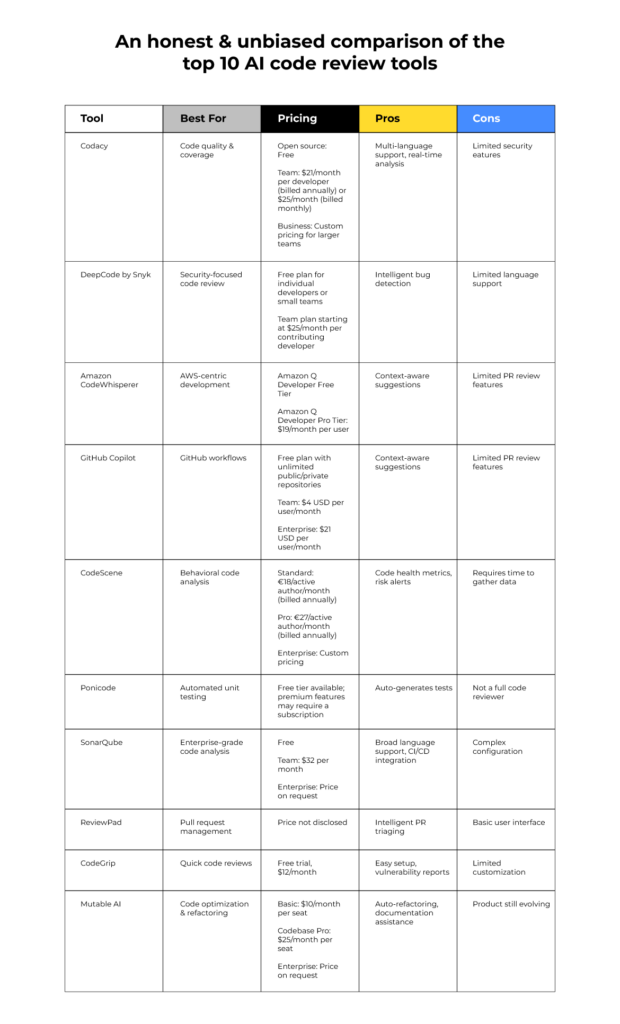
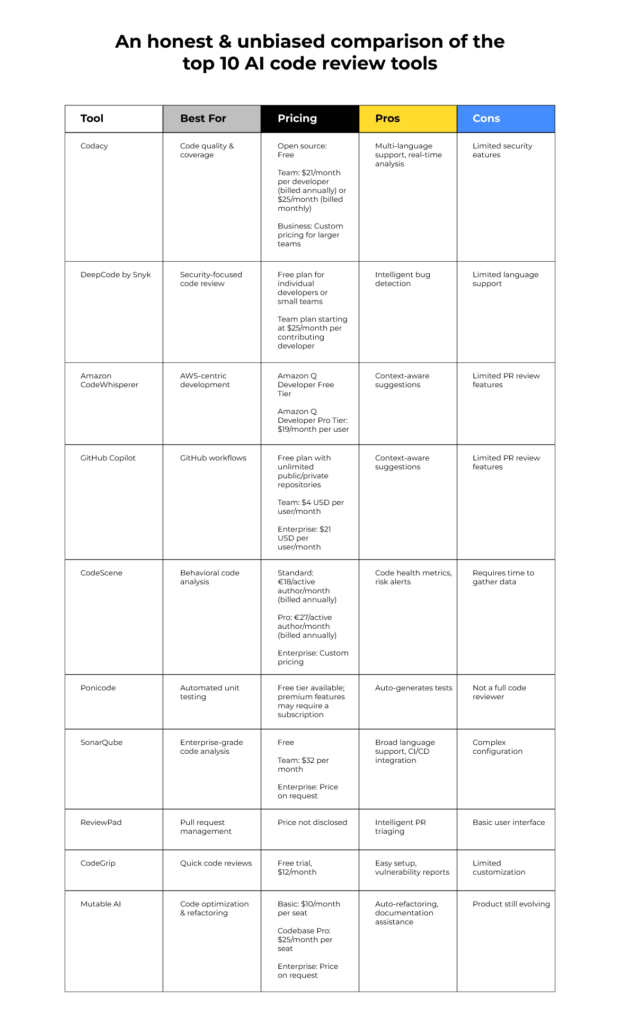
GitHub Copilot: AI in the editor
GitHub Copilot stands apart from traditional code review services because it operates during the coding process, not just after. It’s an AI pair programmer that offers real-time suggestions as you type, based on the context of your code and the vast amount of public code it has been trained on. Think of it as having an incredibly knowledgeable colleague constantly looking over your shoulder.
Its strength lies in auto-completion and identifying potential errors or inefficiencies. Copilot can suggest entire lines of code, or even complete functions, saving developers significant time and effort. It’s particularly effective for repetitive tasks or when working with unfamiliar APIs. It supports a wide range of languages, including Python, JavaScript, TypeScript, Ruby, Go, and C#.
Copilot isn't a replacement for a human. It makes mistakes. You still have to check every suggestion for security flaws or logic errors. It's a fast assistant, but you're still the one in charge of the commit.
Copilot integrates seamlessly with popular IDEs like Visual Studio Code, Neovim, and JetBrains IDEs. This integration is a major advantage, as it allows developers to leverage its capabilities without leaving their familiar coding environment. The pricing is subscription-based, currently at $10 per month or $100 per year for individuals, and $19 per user per month for businesses.
Copilot is only as good as its training data. It is great at churning out boilerplate or basic functions, but it often trips up on complex logic. I've found it most useful for the boring, repetitive parts of a file.
Sourcegraph: Universal Code Search
Sourcegraph takes a different approach than Copilot. It's not primarily focused on suggesting code changes as you write, but rather on helping you understand large and complex codebases. Its core strength is universal code search – the ability to quickly and easily find any piece of code across all of your repositories.
This is incredibly valuable for identifying potential bugs, security vulnerabilities, and code duplication. Imagine you need to find all instances of a specific function call across hundreds of repositories. Sourcegraph can do that in seconds, saving you hours of manual searching. It’s also excellent for onboarding new team members, allowing them to quickly grasp the architecture of a large project.
Sourcegraph focuses on code intelligence, providing features like "go-to-definition’, ‘find-references’, and ‘hover-to-reveal". These features allow you to navigate code more efficiently and understand how different parts of the system interact. It also tracks code changes over time, making it easy to see how a particular piece of code has evolved.
Is Sourcegraph a full-fledged code review tool? Not exactly. It's more of a code navigation and analysis platform that supports the code review process. While it doesn't have built-in features for creating pull requests or adding comments, it can significantly enhance the efficiency of your existing code review workflow. It allows reviewers to quickly understand the context of changes and identify potential issues.
Sourcegraph’s pricing varies depending on the number of users and the features you need. They offer a free tier for individuals and small teams, as well as paid plans for larger organizations. It integrates with popular code hosting platforms like GitHub, GitLab, and Bitbucket, making it easy to connect to your existing repositories.
- Universal code search to find snippets across every repository you own.
- Code Intelligence: Go-to-definition, find-references, hover-to-reveal.
- Code Change Tracking: See how code has evolved over time.
- Integration: GitHub, GitLab, Bitbucket.
Code Search Capabilities: Sourcegraph vs. GitHub (2026)
| Search Speed | Codebase Size Support | Language Support | Cross-Repository Search | Code Intelligence Features |
|---|---|---|---|---|
| Sourcegraph | High | High | High | High |
| GitHub | Medium | Medium | Medium | Medium |
Illustrative comparison based on the article research brief. Verify current pricing, limits, and product details in the official docs before relying on it.
CodeClimate: Quality Metrics Focused
CodeClimate distinguishes itself by its strong focus on code quality metrics. It analyzes your code and provides feedback on maintainability, security, and duplication. It's designed to help teams enforce coding standards and identify areas where code can be improved. Unlike Copilot’s immediate suggestions, or Sourcegraph's deep dives, CodeClimate provides aggregate insights.
A key feature of CodeClimate is its integration with CI/CD pipelines. This allows you to automate code review and ensure that code meets your quality standards before it's merged into the main branch. It can automatically flag pull requests that violate your defined rules and prevent them from being merged.
CodeClimate provides detailed reports on code quality, highlighting areas of concern and tracking progress over time. These reports can be used to identify trends and prioritize improvements. It supports a wide range of languages and frameworks, and can be customized to fit your specific needs. It also provides security vulnerability detection.
Is CodeClimate best for enforcing coding standards or finding deeper bugs? It excels at both, but its primary strength lies in enforcing standards. It can automatically check for things like code style violations, complexity, and duplication. While it can also identify some potential bugs, it's not as effective as Copilot or Sourcegraph for finding complex logic errors.
CodeClimate offers various pricing plans, depending on the size of your team and the features you need. They offer a free plan for open-source projects, as well as paid plans for commercial organizations. It’s a great choice for teams that are serious about code quality and want to automate the review process.
How they stack up
Let's directly compare these services. Integration with existing workflows is strong for all three, but differs in approach. Copilot integrates directly into your IDE, Sourcegraph connects to your repositories, and CodeClimate integrates into your CI/CD pipeline.
Support for different languages is broad across the board. Copilot and CodeClimate cover many popular languages, while Sourcegraph’s strength is in its ability to index and search any code, regardless of language. Scalability is a major advantage of Sourcegraph, designed to handle massive codebases. Copilot and CodeClimate scale well, but are more focused on individual developer productivity or team-level quality.
Reporting capabilities are a key differentiator. CodeClimate provides detailed reports on code quality metrics, while Sourcegraph offers insights into code dependencies and changes. Copilot’s reporting is less focused on metrics and more on providing suggestions and identifying potential issues. Ease of use is subjective, but Copilot is generally considered the easiest to get started with, thanks to its seamless IDE integration.
Copilot does really well at accelerating development by providing real-time suggestions. Sourcegraph excels at understanding and navigating complex codebases. CodeClimate shines at enforcing coding standards and tracking code quality over time. The ideal choice depends on your priorities.
- Copilot is best for writing boilerplate and speeding up the initial draft.
- Sourcegraph: Best for understanding large codebases and performing cross-repository searches.
- CodeClimate: Best for enforcing coding standards and tracking code quality.
Real-World Use Cases
Consider a fast-paced startup building a new web application. They need to move quickly and iterate rapidly. In this scenario, GitHub Copilot would be a valuable asset, helping developers write code faster and reduce the risk of simple errors. It allows them to ship features more quickly without sacrificing quality.
Now imagine a large enterprise maintaining a complex financial system with millions of lines of code. They need to understand the impact of changes and ensure that the system remains stable and secure. Here, Sourcegraph would be the tool of choice, enabling them to quickly search and analyze the codebase, identify potential risks, and track changes over time.
Finally, picture a team dedicated to improving the overall quality of their software. They want to enforce coding standards, reduce technical debt, and prevent bugs from slipping into production. For this team, CodeClimate would be the perfect solution, automating code review and providing actionable insights into code quality.
Let’s say a team is refactoring a legacy application. Sourcegraph can help them understand the existing code and identify dependencies, while Copilot can assist in writing the new code, and CodeClimate can ensure that the refactored code meets quality standards. These tools aren’t necessarily mutually exclusive – they can be used together to create a comprehensive code review process.
Boost Your Code Review Workflow: Essential Tools & Books
![Perixx PERIBOARD-535BR [Firmware Updated] Wired Ergonomic Mechanical Keyboard - Full-Size - Low-Profile Brown Tactile Switches - NKRO Anti-Ghosting - Compatible with Windows and macOS](https://m.media-amazon.com/images/I/71d5v14gj8L._AC_UY654_QL65_.jpg)
Ergonomic design for comfortable typing · Low-profile brown tactile mechanical switches · Full-size layout with NKRO and anti-ghosting
This keyboard enhances developer comfort during long coding sessions, a crucial factor for productivity in any development environment.

Covers principles of clean code and agile development · Provides practical advice for writing maintainable software · Authored by renowned software engineer Robert C. Martin
Understanding clean code principles is fundamental for effective code reviews and writing high-quality software.

Offers timeless advice for software development mastery · Covers a wide range of topics from philosophy to practical techniques · Updated for modern software development practices
This book provides essential wisdom for developers aiming to improve their craft, which directly impacts the quality of code submitted for review.

Explores theoretical concepts of cloud computing · Details practical applications of cloud technologies · Covers telecommunication engineering aspects of cloud services
A foundational understanding of cloud technologies is vital for anyone working with cloud-based code review services.

Introduces high-performance computing concepts · Focuses on applications for scientists and engineers · Covers computational science techniques
This book offers insights into performance optimization, which can be relevant for code reviews focused on efficiency in high-performance computing environments.
As an Amazon Associate I earn from qualifying purchases. Prices may vary.

No comments yet. Be the first to share your thoughts!