AI code review in 2026
We're writing more code than ever, and it's getting messier. Manual reviews are slow, and let's be honest, we miss things when we're tired or rushed. Relying solely on humans to catch every bug is a recipe for a bottleneck.
Enter AI-powered code review services. These tools aren’t meant to replace human reviewers entirely, at least not yet. Instead, they act as a first line of defense, automating the detection of common errors, suggesting improvements, and flagging potential security vulnerabilities. They free up human developers to focus on the more nuanced aspects of code quality – design, architecture, and business logic.
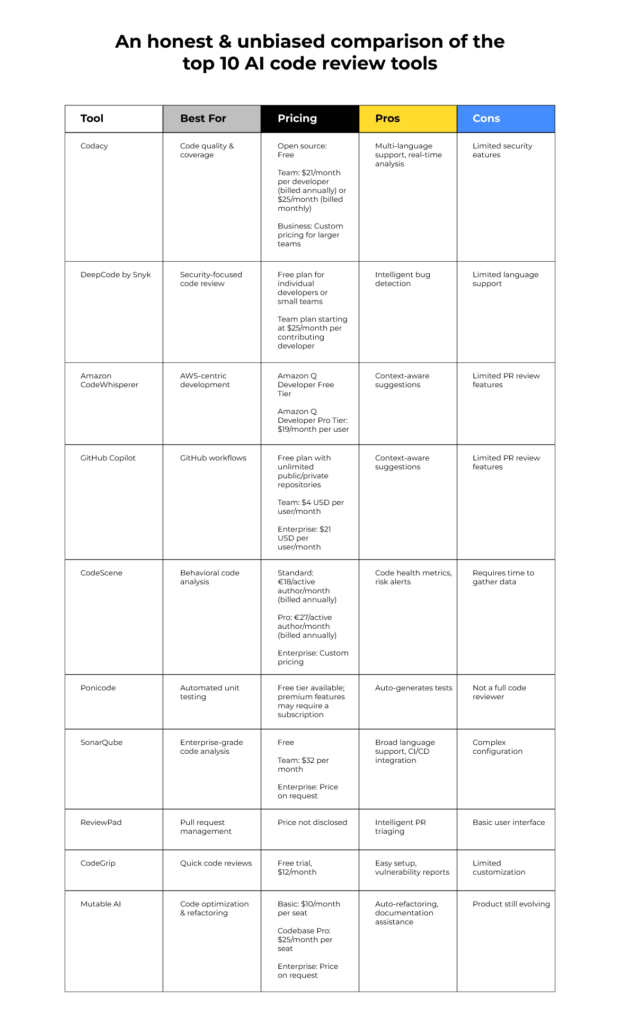
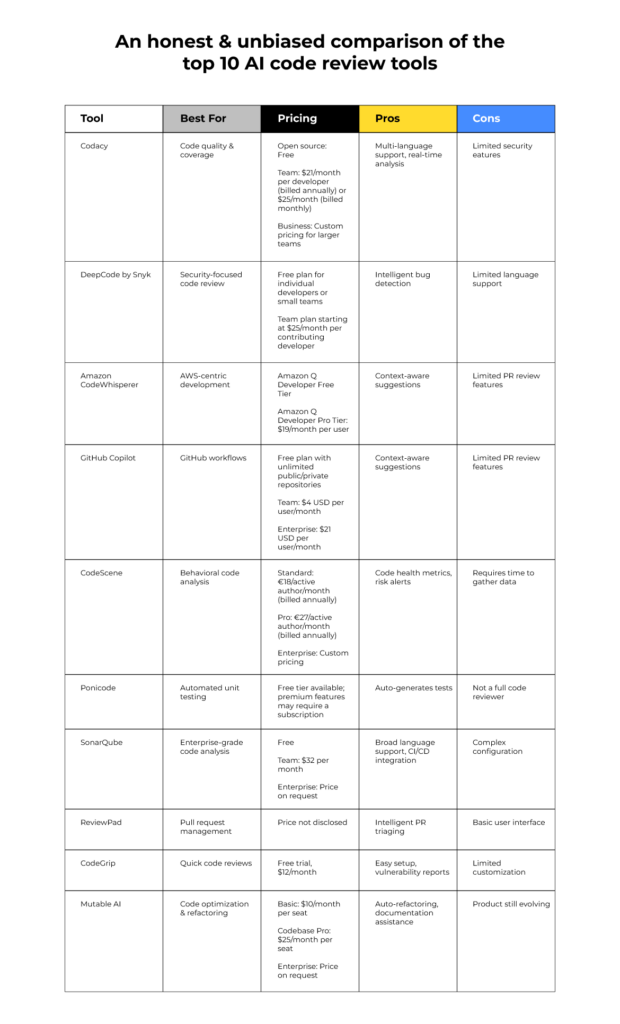
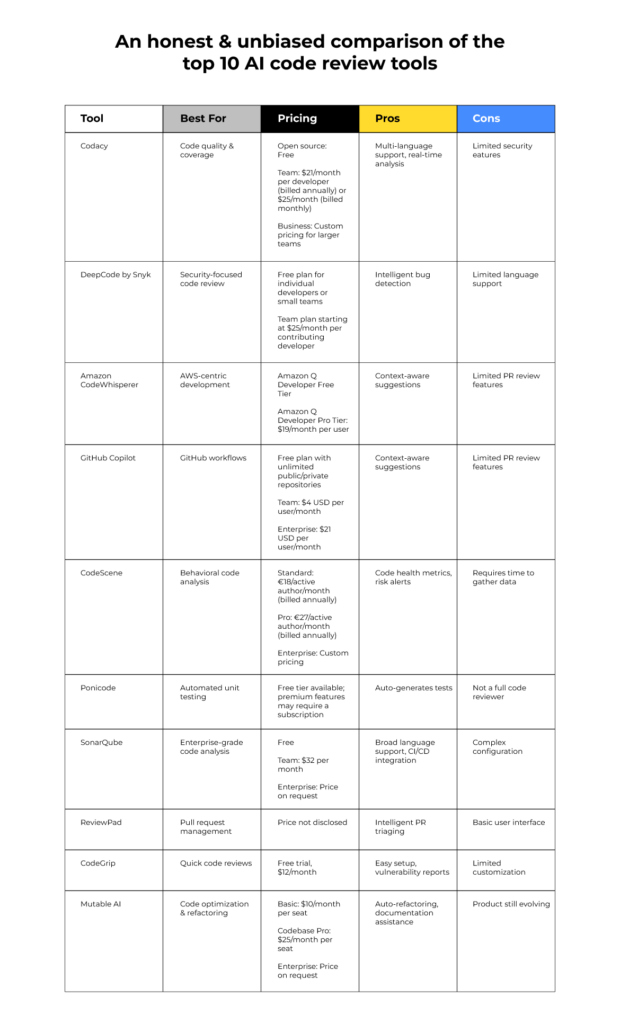
GitHub Copilot, AWS CodeWhisperer, and Cursor are the three big names right now. Copilot is the default for most, CodeWhisperer is Amazon's security-focused alternative, and Cursor is a standalone editor that feels different because it was built for AI from day one.
GitHub Copilot: the standard choice
GitHub Copilot has quickly become the most recognizable name in AI-assisted coding. Its core functionality revolves around autocompletion, but it’s far more sophisticated than traditional autocomplete features. Copilot doesn’t just suggest the next line of code; it can generate entire functions, suggest alternative implementations, and even translate code between different programming languages.
One of Copilot’s key strengths is its deep integration with popular IDEs, particularly VS Code. This tight integration makes it feel like a natural extension of the development environment. It also benefits from a massive training dataset – billions of lines of public code from GitHub repositories. This allows Copilot to understand a wide range of coding styles and patterns, and to provide contextually relevant suggestions. The ability to explain code snippets, generating documentation on the fly, is also a significant time saver.
Copilot still makes mistakes. It will confidently suggest buggy or insecure code if you aren't paying attention. You're also looking at $10 a month, and the legal side of things—like whether it's just regurgitating licensed code—is still a bit of a mess.
Despite these concerns, Copilot remains a powerful tool for increasing developer productivity. Its ability to reduce boilerplate code and accelerate development cycles is undeniable. It’s especially useful for tasks like writing unit tests, generating documentation, and exploring new APIs. The continuous improvements to the underlying AI model are steadily addressing concerns about code quality and security.
- Predicts and suggests code as you type
- Creates entire functions or code blocks based on context
- Code Explanation: Generates human-readable explanations of code snippets.
- Test Generation: Helps write unit tests for your code.
AWS CodeWhisperer: The Cloud Contender
AWS CodeWhisperer is Amazon’s entry into the AI code review space. It shares many similarities with Copilot, offering features like code completion and code generation. However, CodeWhisperer differentiates itself with a strong emphasis on security scans and integration with AWS services. It’s designed to seamlessly integrate into the AWS ecosystem, making it a natural choice for developers already heavily invested in the AWS cloud.
A key advantage of CodeWhisperer is its free tier for individual use. This makes it an attractive option for developers who want to experiment with AI-assisted coding without a financial commitment. The paid tier, CodeWhisperer Professional, unlocks additional features like administrative controls and enhanced security scans. These scans are designed to identify potential vulnerabilities and suggest remediation steps, helping developers write more secure code.
One potential limitation of CodeWhisperer is that it may be less effective outside of the AWS ecosystem. Its training data is heavily biased towards AWS services and APIs, so its suggestions might be less relevant when working with other technologies. Additionally, CodeWhisperer has a smaller user base compared to Copilot, which means it benefits from less community feedback and fewer contributions to its knowledge base. However, Amazon’s commitment to continuous improvement suggests that CodeWhisperer will continue to evolve and expand its capabilities.
Cursor: The AI-Native Editor
Cursor takes a fundamentally different approach to AI-assisted coding. Unlike Copilot and CodeWhisperer, which are primarily extensions for existing IDEs, Cursor is a code editor built from the ground up with AI at its core. This allows it to offer a more integrated and seamless AI experience.
Cursor’s features go beyond simple code completion. It can generate entire functions from natural language prompts, refactor code with a single click, and even engage in conversational debugging. The conversational interface is particularly noteworthy – you can ask Cursor questions about your code, and it will respond in a human-like manner. This can be incredibly helpful for understanding complex codebases or troubleshooting difficult bugs.
The advantage of being AI-native is that Cursor has complete control over the development environment. This allows it to optimize the user experience for AI-assisted coding. However, it also means that Cursor is a less established editor than VS Code or other popular IDEs. It may lack some of the features and extensions that developers have come to rely on. The learning curve can be steeper for developers accustomed to traditional IDEs. Still, Cursor’s innovative approach is attracting a growing number of users who are eager to explore the future of AI-assisted coding.
How they actually feel to use
Comparing these tools isn’t simply a matter of listing features. It’s about how those features feel in practice. GitHub Copilot excels at providing contextually relevant suggestions within an existing codebase. It feels like a helpful pair programmer, anticipating your needs and offering intelligent assistance. However, the quality of its suggestions can vary, and it sometimes requires careful review to avoid introducing errors.
AWS CodeWhisperer, while capable, often feels less polished than Copilot. Its suggestions can be more generic, and it sometimes struggles to understand the nuances of complex code. However, its security scans are a valuable addition, and its integration with AWS services is seamless. For developers primarily working within the AWS ecosystem, CodeWhisperer is a strong contender.
Cursor, on the other hand, offers a radically different experience. Its AI-native design allows it to generate code and refactor existing code in ways that Copilot and CodeWhisperer can’t match. The conversational interface is a game-changer, making it easier to understand and debug code. However, the editor itself is still evolving, and it may lack some of the features and extensions that developers are accustomed to. It’s a powerful tool, but it requires a willingness to embrace a new way of working.
Code completion quality is generally highest with Copilot for common languages, but Cursor’s ability to generate larger blocks of code from prompts often surpasses both others. Accuracy of suggestions varies across languages; all tools perform better with popular languages like Python and JavaScript. Ease of use is subjective, but Copilot’s integration with VS Code gives it an edge for developers already familiar with that IDE. Support for various programming languages is broad across all three, but specialized languages may see better support in one tool versus another.
AI Code Review Service Comparison - 2026
| Feature | GitHub Copilot | AWS CodeWhisperer | Cursor |
|---|---|---|---|
| Code Completion Accuracy | Excellent - Strong context understanding, excels with common patterns. | Good - Performs well, particularly within AWS ecosystem. | Good - Balances completion with code navigation features. |
| Security Focus | Good - Offers vulnerability detection, but relies on user review. | Excellent - Strong emphasis on identifying and flagging security vulnerabilities, integrates with security tools. | Fair - Security checks present, but may require more manual verification. |
| IDE Integration | Excellent - Native integration with VS Code, Neovim, JetBrains IDEs. | Good - Well integrated with VS Code, AWS Cloud9, and JetBrains IDEs. | Excellent - Designed for VS Code, with a focus on a streamlined, integrated experience. |
| Ease of Use | Good - Requires some learning to effectively leverage suggestions. | Good - Relatively straightforward, especially for AWS users. | Excellent - Intuitive interface, designed for quick adoption and usability. |
| Customization | Good - Limited customization options, primarily through settings. | Fair - Customization primarily focused on code style preferences. | Good - Offers more granular control over code generation and editing behavior. |
| Cost | Subscription based - Pricing varies based on user type. | Free tier available, with paid options for professional use. | Subscription based - Offers different tiers with varying features. |
| Language Support | Broad - Supports a wide range of popular programming languages. | Good - Strong support for Python, Java, JavaScript, and other common languages. | Good - Supports many languages, with a focus on web development technologies. |
| Contextual Awareness | Excellent - Demonstrates strong understanding of project context. | Good - Contextual awareness improves with AWS service usage. | Good - Contextual understanding is good, particularly within the Cursor ecosystem. |
Qualitative comparison based on the article research brief. Confirm current product details in the official docs before making implementation choices.
Security and Compliance: A Critical Look
The introduction of AI code review tools raises legitimate security concerns. These tools are trained on vast amounts of code, including potentially vulnerable or malicious code. If not carefully managed, they could inadvertently introduce security flaws into your codebase. It’s crucial to understand how these tools handle sensitive code and what measures they take to mitigate security risks.
GitHub Copilot has faced criticism for occasionally suggesting code with known security vulnerabilities. While Microsoft has implemented safeguards to address this issue, it remains a concern. AWS CodeWhisperer’s focus on security scans is a positive step, but it’s not a foolproof solution. No AI tool can guarantee the security of your code – human review is still essential. Cursor, being newer, has less of a track record regarding security vulnerabilities, but its AI-native design allows for more granular control over code generation and analysis.
Compliance with industry standards, such as GDPR and HIPAA, is another important consideration. Developers need to ensure that their use of AI code review tools doesn’t violate any data privacy regulations. This is particularly important when working with sensitive customer data. It’s essential to carefully review the terms of service and privacy policies of each tool before using it in a production environment. Employing static analysis tools in conjunction with AI-powered code review can provide an additional layer of security.
Pricing and Accessibility: What Does It Cost?
Pricing varies significantly across these tools. GitHub Copilot currently costs $10 per month or $100 per year for individual developers. This provides access to all of Copilot’s features. AWS CodeWhisperer offers a free tier for individual use, with limited functionality. The paid tier, CodeWhisperer Professional, costs $19 per month, unlocking administrative controls and enhanced security scans.
Cursor’s pricing is more complex, with different tiers based on usage and features. As of late 2026, they offer a free plan with limited AI executions, a Pro plan at $9 per month for increased usage, and a Team plan with collaborative features. Accessibility is generally good across all three tools, with support for major operating systems and IDEs. However, CodeWhisperer’s tight integration with AWS services may limit its appeal to developers outside of the AWS ecosystem.
The value proposition of each pricing plan depends on your individual needs and budget. If you’re a solo developer working on personal projects, CodeWhisperer’s free tier may be sufficient. If you’re a professional developer working on large-scale projects, Copilot’s paid plan or Cursor’s Pro plan may be a better investment.
Level Up Your Coding Setup: Gear for AI-Assisted Development

Quiet Perfect-Stroke Keys for comfortable typing · Logi Bolt Technology for secure wireless connectivity · Rechargeable battery with long life
Elevate your typing experience with this comfortable and reliable wireless keyboard, perfect for long coding sessions.

Ergonomic design for optimal posture support · Fully loaded with PostureFit SL for advanced lumbar support · Breathable Pellicle material for all-day comfort
Invest in superior comfort and ergonomic support with the iconic Aeron chair to maintain focus during intensive coding tasks.

Stunning 4K UHD resolution for sharp visuals · 27-inch screen size for ample workspace · Wide color coverage for accurate representation
Experience crystal-clear code and vibrant visuals on this high-resolution 4K monitor, enhancing your ability to review code effectively.

Compact 75% layout saves desk space · Mechanical switches for satisfying tactile feedback · White LED backlit keys for low-light visibility
Enjoy a responsive and tactile typing feel with this compact mechanical keyboard, ideal for efficient coding and Mac/Windows compatibility.

Memory foam provides comfortable lower back support · Ergonomic design promotes improved posture · Versatile for office chairs, car seats, and more
Add targeted lower back support to any chair with this memory foam pillow, ensuring comfort and better posture throughout your workday.
As an Amazon Associate I earn from qualifying purchases. Prices may vary.

No comments yet. Be the first to share your thoughts!