The shift toward automated code review
For decades, code review has been a cornerstone of software development. It's a process where developers scrutinize each other’s code to identify bugs, improve quality, and share knowledge. But traditional code review can be slow, tedious, and prone to human error. That’s where AI-powered code review comes in.
These tools aren’t meant to replace human reviewers, but to augment them. They can automate many of the more repetitive and time-consuming aspects of the process, like identifying common coding errors and suggesting improvements. This frees up developers to focus on more complex issues and strategic thinking.
GitHub Copilot, Amazon CodeWhisperer, and Cursor are the primary options right now. They handle code differently, so the right choice depends on your existing stack. Here is how they compare on features and cost.
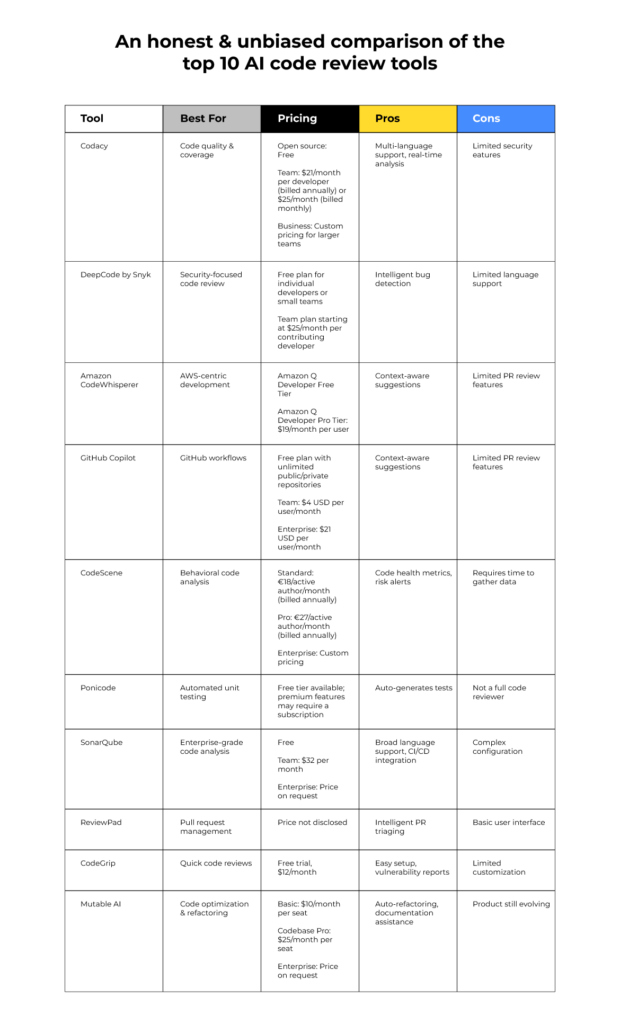
GitHub Copilot: The standard for general use
GitHub Copilot is arguably the most well-known AI code completion and suggestion tool. Developed by GitHub and OpenAI, it’s built on the Codex model, which was trained on billions of lines of public code. It works by suggesting code snippets and entire functions as you type, aiming to significantly accelerate the development process.
Copilot’s strengths lie in its broad language support and deep integration with popular IDEs. It’s particularly well-suited for use with VS Code, where it feels almost native. It also integrates with Neovim and JetBrains IDEs. Beyond code completion, it can also help with bug detection, offering suggestions for fixing errors as they arise.
Copilot has flaws. It occasionally suggests insecure code or snippets that mirror licensed public repositories. You have to check its output manually to avoid legal or security headaches.
As of late 2023, GitHub Copilot is available for $10 per month or $100 per year for individuals. Business plans with additional features are also available, starting at $19 per user per month. These prices are subject to change, but represent the current landscape.
Amazon CodeWhisperer: Built for the AWS ecosystem
Amazon CodeWhisperer is Amazon’s entry into the AI code review space. A key differentiator is its tight integration with AWS services. If you're heavily invested in the AWS ecosystem, CodeWhisperer can be a particularly valuable asset, offering suggestions specifically tailored to AWS APIs and best practices.
CodeWhisperer supports a variety of programming languages, including Python, Java, JavaScript, and C#. It can help developers write more secure and efficient code by identifying potential vulnerabilities and suggesting improvements. It also offers code completion capabilities, similar to Copilot, but with a stronger focus on AWS-related code.
Compared to Copilot, CodeWhisperer's general code completion capabilities might be slightly less comprehensive, especially outside of the AWS context. However, its security scanning features are a notable strength. It can scan your code for security vulnerabilities and provide remediation advice.
Amazon offers a free tier for individual use, with limited features. The Professional tier, which unlocks more advanced features and organizational controls, costs $19 per user per month. This makes it a competitive option, especially for teams already invested in AWS.
Cursor: An IDE with built-in intelligence
Cursor takes a different approach than Copilot and CodeWhisperer. It’s not simply an add-on to an existing IDE; it is an IDE, built from the ground up with AI at its core. This means that AI is integrated into every aspect of the development experience, from code generation to debugging.
Cursor boasts features like AI-powered code generation, refactoring, and debugging. It can help you quickly prototype new ideas, automate repetitive tasks, and identify and fix bugs. Its interface is designed to be intuitive and efficient, with a strong emphasis on AI assistance.
The biggest difference with Cursor is the fundamental experience. While Copilot and CodeWhisperer enhance existing workflows, Cursor aims to redefine them. However, this can be a drawback for developers who are deeply entrenched in VS Code or other IDEs and prefer not to switch.
Cursor offers a free tier with limited features. Paid plans start at $9 per month for individuals and scale up for teams. The pricing reflects its position as a full-fledged IDE, rather than just an AI assistant. It’s a compelling option for developers seeking a truly AI-first development environment.
How the features compare
Comparing these tools across key features reveals subtle but important differences. All three offer code completion, but Copilot generally provides broader language support, while CodeWhisperer excels within the AWS ecosystem. Cursor’s code generation is often more comprehensive, but its language support is still evolving.
In terms of IDE integration, Copilot has the widest reach, working seamlessly with VS Code, Neovim, and JetBrains IDEs. CodeWhisperer integrates well with AWS Cloud9 and VS Code, while Cursor is limited to its own IDE. This is a major consideration for developers who prefer a specific development environment.
Bug detection capabilities are present in all three tools, but they vary in sophistication. CodeWhisperer stands out with its security scanning features, while Copilot offers more general bug suggestions. Cursor’s debugging tools are tightly integrated with its AI engine, offering a unique approach to identifying and fixing errors.
Customizability is another key differentiator. Copilot allows some customization of its suggestions, while CodeWhisperer offers limited options. Cursor provides more extensive customization options, allowing developers to tailor the AI's behavior to their specific preferences.
- Copilot supports the most languages, while CodeWhisperer focuses on the AWS stack.
- You can use Copilot in VS Code and JetBrains, but Cursor requires you to use its own standalone editor.
- Code Completion Accuracy: Copilot (generally high), CodeWhisperer (high within AWS), Cursor (variable, improving)
- Bug Detection: All offer basic bug detection; CodeWhisperer excels in security scanning
- Customizability: Copilot (moderate), CodeWhisperer (limited), Cursor (extensive)
AI Code Review Service Comparison (2026)
| Feature | GitHub Copilot | AWS CodeWhisperer | Cursor |
|---|---|---|---|
| Ease of Use | Excellent 👍 | Good | Excellent |
| AWS Integration | Limited | Excellent 🚀 | Fair |
| IDE Support | Broad - VS Code, JetBrains, Neovim | VS Code, JetBrains, AWS Cloud9 | VS Code, JetBrains, and more via extensions |
| Code Quality Suggestions | Good - focuses on completion & common patterns | Good - strong on security best practices | Better for - offers refactoring suggestions |
| Security Checks | Fair - basic vulnerability detection | Excellent - designed with security as a priority | Good - integrates with static analysis tools |
| Customization Options | Good - configurable settings, but limited code style control | Fair - primarily focused on security recommendations | Excellent - highly customizable, supports custom prompts and workflows |
| Context Awareness | Good - understands project context well | Good - benefits from AWS ecosystem knowledge | Excellent - designed for deep understanding of codebases |
| Cost | Subscription based - varies with usage | Tiered pricing, including a free tier | Subscription based - multiple tiers |
Qualitative comparison based on the article research brief. Confirm current product details in the official docs before making implementation choices.
Choosing the right tool for your project
The ideal tool depends heavily on the project. For general-purpose development, where you need broad language support and IDE compatibility, GitHub Copilot is a solid choice. It’s a versatile tool that can boost productivity across a wide range of projects.
If you’re building applications on AWS, Amazon CodeWhisperer is a natural fit. Its deep integration with AWS services and security scanning capabilities make it a valuable asset for AWS developers. It can help you write more secure and efficient code within the AWS ecosystem.
For developers seeking a fundamentally different experience, Cursor offers a compelling alternative. If you're open to adopting a new IDE and want a truly AI-first development environment, Cursor could be a game-changer. It’s particularly well-suited for prototyping and experimentation.
Consider a team working on a Python-based web application. Copilot would provide strong general code completion. If that application heavily utilizes AWS Lambda functions and DynamoDB, CodeWhisperer’s specific AWS knowledge would become invaluable. A solo developer experimenting with a new framework might find Cursor’s AI-powered refactoring to be particularly helpful.
Community Feedback: What Developers Are Saying
Developer sentiment towards these tools is generally positive, but each has its detractors. Copilot receives praise for its speed and accuracy, but some users complain about its occasional suggestions of insecure or copyrighted code. Many appreciate its broad language support, but others find it can be overly verbose.
CodeWhisperer is often lauded for its security features and AWS integration. Developers working with AWS services frequently report significant productivity gains. However, some users have noted that its code completion capabilities outside of the AWS context are less impressive.
Cursor has garnered a dedicated following among developers who appreciate its AI-first approach. Users praise its intuitive interface and powerful AI-powered features. However, the requirement to switch to a new IDE is a barrier for some.
The consensus on r/programming is that these are assistants, not replacements. Most users agree that you can't trust the output blindly, especially since AI can repeat common biases found in older repositories.
- Copilot: “It’s a huge time saver, but you always need to double-check the suggestions.” - Reddit user
- CodeWhisperer: “I’m an AWS developer, and this tool has become indispensable.” - AWS forums
- Cursor: “The AI-powered refactoring is incredible. It’s like having a pair programmer.” - Cursor community forum
Featured Products

Practical guidance on integrating GitHub Copilot into the software development lifecycle · Strategies for transforming development workflows with AI assistance · Focus on leveraging GitHub Copilot for enhanced productivity
This handbook offers practical insights into using GitHub Copilot to streamline and enhance the entire software development process.
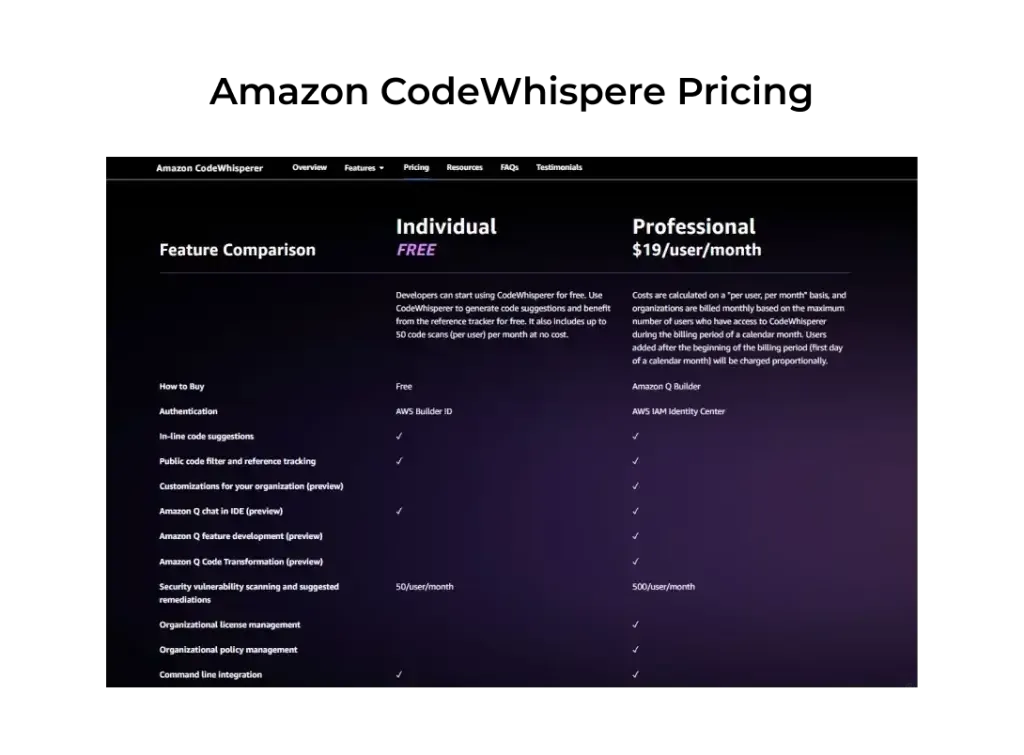
Real-time code suggestions based on comments and existing code · Supports multiple programming languages · Includes security scanning to identify vulnerabilities
Amazon CodeWhisperer provides free, real-time code suggestions and security scans, making it an accessible AI coding assistant for individual developers.
AI-powered code editor designed for faster development · Integrated AI chat for code explanation and generation · Seamless integration with AI models for code assistance
Cursor IDE is an AI-first code editor that deeply integrates AI features to help developers write, understand, and debug code more efficiently.

Beginner-friendly introduction to Tabnine AI · Focuses on achieving faster and smarter coding · Covers the fundamentals of AI coding assistants
This book serves as an excellent starting point for beginners looking to understand and utilize Tabnine AI for improved coding speed and intelligence.

Practical guide to various AI coding tools including ChatGPT and GitHub Copilot · Focuses on boosting software development efficiency · Covers a range of AI technologies beyond just code generation
This comprehensive guide explores how to leverage a variety of AI tools, including popular ones like ChatGPT and GitHub Copilot, to significantly enhance software development.
As an Amazon Associate I earn from qualifying purchases. Prices may vary.

No comments yet. Be the first to share your thoughts!