AI code review is the new baseline
The software development process is undergoing a significant transformation, driven by advances in artificial intelligence. Traditionally, code review has been a manual process, relying on the expertise of senior developers to identify potential bugs and security vulnerabilities. This method, while effective, is often time-consuming and prone to human error. Now, AI-powered code review services are emerging as a crucial component of modern development workflows.
The shift towards automated systems isn’t about replacing developers, but rather augmenting their abilities. These tools analyze code in real-time, flagging potential issues before they even make it to testing. This proactive approach to bug prevention is a major departure from the reactive debugging cycles of the past. The primary goal is to reduce technical debt and improve overall software quality.
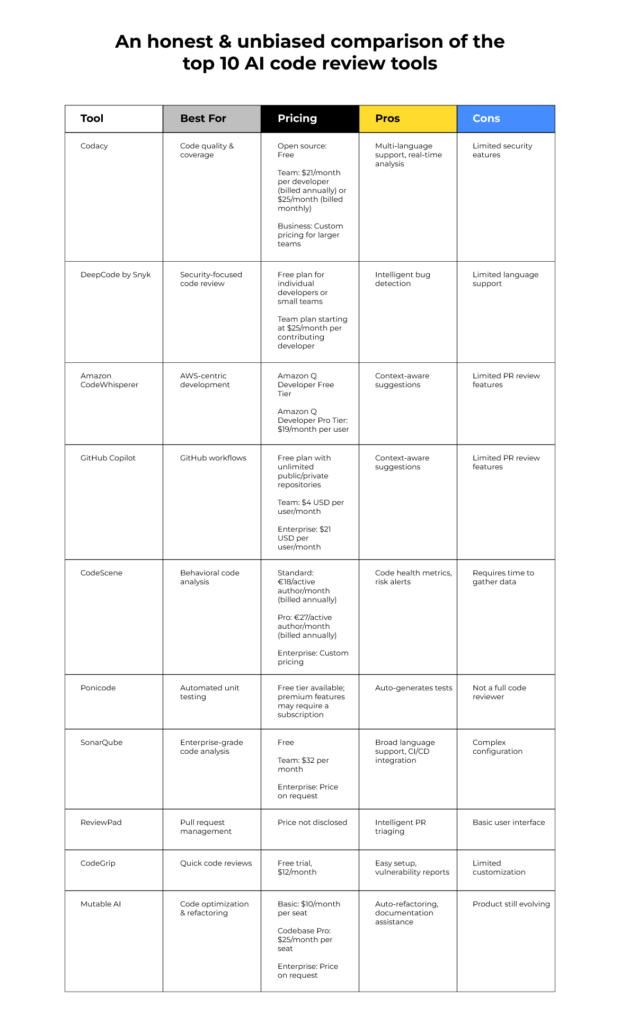
GitHub Copilot and Amazon CodeWhisperer are the two biggest names here. Both use large language models to suggest code and flag errors before they reach production. I've compared how they handle bug prevention based on their current 2026 features.
How GitHub Copilot handles bugs
GitHub Copilot, developed by GitHub and OpenAI, is arguably the most well-known AI pair programmer. It functions as an extension to popular Integrated Development Environments (IDEs) like Visual Studio Code and JetBrains, providing real-time code suggestions as you type. Copilot’s core strength lies in its ability to understand the context of your code and generate relevant code snippets, often completing entire functions or blocks of code with minimal input.
The tool’s functionality extends beyond simple autocompletion. Copilot can detect potential bugs, suggest more efficient code implementations, and even generate unit tests. It’s trained on a massive dataset of publicly available code, allowing it to recognize patterns and offer solutions across a wide range of programming languages. This extensive training data is both a strength and a consideration, as it can occasionally suggest code with licensing implications – something developers need to be aware of.
Copilot helps most by stopping bugs before you even hit save. It suggests patterns that avoid common pitfalls, which means you spend less time in the debugger later. It isn't a replacement for a QA team, but it cuts down on the 'easy' mistakes that usually clutter pull requests.
Copilot’s integration with VS Code and JetBrains is seamless, offering a natural and intuitive development experience. Developers can accept or reject suggestions with simple keyboard shortcuts, allowing them to maintain control over the code generation process. The tool also learns from your coding style and preferences, becoming more accurate and relevant over time. Its ability to understand complex codebases and provide context-aware suggestions is a key differentiator.
Amazon CodeWhisperer and the AWS ecosystem
Amazon CodeWhisperer is Amazon’s entry into the AI code review and generation market. Similar to Copilot, it integrates with popular IDEs, offering real-time code suggestions and autocompletion. However, CodeWhisperer distinguishes itself through its tight integration with Amazon Web Services (AWS). It’s particularly adept at generating code that interacts with AWS services, such as Lambda, S3, and EC2.
CodeWhisperer also places a strong emphasis on security. It’s designed to identify potential security vulnerabilities, such as SQL injection flaws and cross-site scripting (XSS) attacks. The tool scans code for insecure patterns and provides suggestions for remediation. This focus on security is a significant advantage, especially for teams building applications that handle sensitive data.
The code generation capabilities of CodeWhisperer are comparable to those of Copilot. It can generate code snippets, complete functions, and even create entire classes based on natural language prompts. However, there are differences in how each tool handles open-source licensing and attribution. CodeWhisperer provides clear attribution for open-source code it suggests, helping developers comply with licensing requirements. This is a critical feature for projects that rely heavily on open-source libraries.
While both tools can generate code in multiple languages, CodeWhisperer seems to perform particularly well with Python and Java, given Amazon’s internal use cases. It's important to note that CodeWhisperer's performance and accuracy continue to improve as Amazon refines its underlying models and expands its training data. Its integration with AWS Cloud9 provides a particularly streamlined development experience for AWS users.
Comparing bug prevention head-to-head
When it comes to preventing bugs, both GitHub Copilot and Amazon CodeWhisperer offer significant benefits. However, their strengths lie in different areas. Copilot excels at identifying and preventing common coding errors, such as null pointer exceptions and off-by-one errors. It’s particularly effective at suggesting more efficient code implementations and avoiding performance bottlenecks.
CodeWhisperer, on the other hand, shines when it comes to security vulnerabilities. Its ability to detect potential security flaws, such as SQL injection and XSS attacks, is a major advantage for teams building web applications. It also offers robust support for identifying and mitigating open-source licensing issues. A direct comparison of performance on specific bug types is difficult without standardized benchmarks, but anecdotal evidence suggests that CodeWhisperer has an edge in security-related bug prevention.
The effectiveness of each tool also varies depending on the programming language. Copilot supports a wider range of languages, while CodeWhisperer seems to perform particularly well with Python and Java. Both tools are constantly evolving, and their language support is likely to expand over time. It's important to consider the specific languages used in your project when choosing a tool.
For example, in scenarios involving complex data structures and algorithms, Copilot often suggests optimizations that improve performance and reduce the risk of memory leaks. Conversely, when working with external APIs and databases, CodeWhisperer is more likely to flag potential security vulnerabilities in the code. The best approach is often to use both tools in conjunction, leveraging their respective strengths to create a more robust and secure codebase.
- Copilot catches null pointer exceptions more reliably than manual review.
- CodeWhisperer is better at spotting SQL injection risks in database queries.
- Memory Leaks: Copilot’s suggestions often lead to more memory-efficient code.
- Open-Source Licensing Issues: CodeWhisperer provides clear attribution and helps ensure compliance.
AI Code Review Service Comparison: Bug Prevention Capabilities (2026)
| Bug Category | GitHub Copilot | AWS CodeWhisperer |
|---|---|---|
| Security Vulnerabilities | Good | Good |
| Explanation | Both tools demonstrate a solid ability to identify common security flaws, such as potential SQL injection points and cross-site scripting vulnerabilities. However, complex, context-dependent security issues may require manual review. | Similar to Copilot, CodeWhisperer effectively flags many common security concerns. The effectiveness is dependent on the complexity of the codebase and the subtlety of the vulnerability. |
| Logic Errors | Fair | Fair |
| Explanation | Identifying logic errors remains a significant challenge for AI-powered tools. Both Copilot and CodeWhisperer can suggest alternative implementations, but reliably detecting flawed logic requires deeper understanding than currently available. | Both tools offer suggestions that *may* reveal logical inconsistencies, but are not consistently effective at independently identifying and explaining complex logic errors. |
| Performance Bottlenecks | Limited | Limited |
| Explanation | Detecting performance bottlenecks requires profiling and understanding runtime behavior. Neither tool currently possesses robust capabilities in this area; suggestions are generally limited to obvious inefficiencies. | CodeWhisperer, like Copilot, struggles with identifying nuanced performance issues. It may suggest improvements to basic algorithms, but lacks the ability to analyze complex execution paths. |
| Code Style Violations | Excellent | Good |
| Explanation | Copilot excels at enforcing code style guidelines and identifying deviations from established conventions. It integrates well with common linters and formatters. | CodeWhisperer provides code style suggestions, but may be less configurable and adaptable to project-specific style rules than Copilot. |
| Contextual Awareness | Good | Good |
| Explanation | Both tools leverage surrounding code to provide relevant suggestions. Copilot's performance is often linked to the quality and clarity of existing code comments and documentation. | CodeWhisperer demonstrates good contextual awareness, but may sometimes generate suggestions that are less aligned with the overall project architecture. |
Illustrative comparison based on the article research brief. Verify current pricing, limits, and product details in the official docs before relying on it.
Beyond the Code: Workflow Integration
The effectiveness of an AI code review service isn't solely determined by its technical capabilities; it's also crucial how well it integrates into existing development workflows. Both Copilot and CodeWhisperer offer integrations with popular version control systems, such as Git, allowing them to analyze code changes during pull requests. However, the level of integration varies.
Copilot’s integration with GitHub pull requests is particularly seamless, allowing reviewers to see AI-generated suggestions directly within the pull request interface. This facilitates collaboration and makes it easier to discuss and address potential issues. CodeWhisperer also supports pull requests, but its integration is not as tightly coupled with GitHub.
Both tools offer features for team collaboration, allowing developers to share suggestions and provide feedback. However, the mechanisms for handling feedback differ. Copilot allows developers to upvote or downvote suggestions, providing valuable data for improving the tool’s accuracy. CodeWhisperer provides more detailed explanations for its suggestions, helping developers understand the reasoning behind them.
Integration with CI/CD pipelines is also an important consideration. Both tools can be integrated into CI/CD pipelines to automatically scan code for potential issues before deployment. This helps ensure that only high-quality, secure code makes it to production. The ease of integration with existing CI/CD tools varies depending on the specific tools used.
The Cost of Prevention
The pricing models for GitHub Copilot and Amazon CodeWhisperer differ significantly. Copilot operates on a subscription basis, with individual plans starting at $10 per month. Business and enterprise plans are also available, offering additional features and support. CodeWhisperer offers a free tier for individual developers, with limitations on the number of scans and suggestions.
For professional use, CodeWhisperer offers a Professional tier at $19 per month, providing unlimited scans and additional features. The cost-benefit ratio of using these tools depends on several factors, including the size of the development team, the complexity of the project, and the potential savings from reduced debugging time and fewer production bugs.
While the subscription costs can be substantial, the potential return on investment is significant. By preventing bugs from reaching production, these tools can save companies time and money on debugging, testing, and remediation. They can also improve software quality and reduce the risk of security breaches. It’s important to carefully evaluate the costs and benefits before making a decision.
Considering the potential for reduced technical debt and improved developer productivity, the investment in these AI code review services can be justified, particularly for large organizations with complex software projects. However, smaller teams may find the costs prohibitive and may prefer to rely on traditional code review methods.
- GitHub Copilot: $10/month (Individual), Business & Enterprise plans available.
- Amazon CodeWhisperer: Free tier (limited), $19/month (Professional).
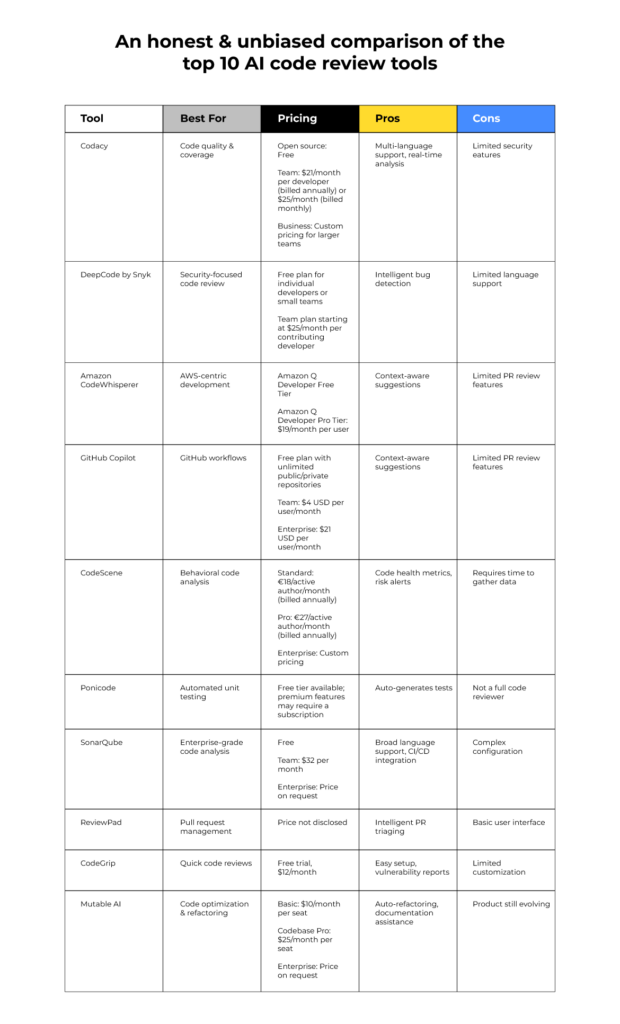
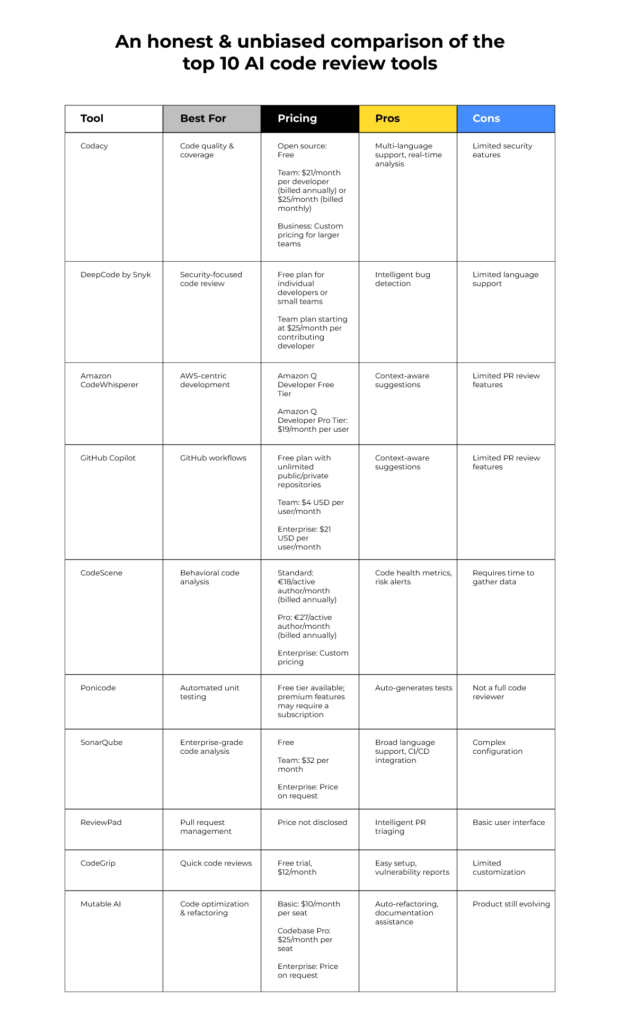
AI Code Review Tools
- CodeTriage - This tool focuses on identifying and prioritizing security vulnerabilities in open-source projects.
- DeepSource - DeepSource automates code reviews, detecting bugs and anti-patterns with a focus on maintainability.
- SonarQube - A widely adopted platform, SonarQube provides continuous inspection of code quality to identify bugs, vulnerabilities, and code smells.
- Semgrep - Semgrep allows developers to define custom rules for finding specific code patterns, making it highly adaptable to project needs.
- Infer - Developed by Meta, Infer is a static analyzer that detects bugs in Java, C, C++, and Objective-C code before runtime.
- LGTM - LGTM analyzes code for potential vulnerabilities and quality issues, integrating with GitHub, GitLab, and Bitbucket.
- Reviewable - Reviewable focuses on streamlining the code review process, providing a detailed diff viewer and discussion threads.
Looking Ahead: 2026 and Beyond
The future of AI-powered code review is bright. As AI models continue to improve, we can expect to see even more sophisticated tools that can identify and prevent a wider range of bugs and security vulnerabilities. We can anticipate more seamless integration with existing development workflows and more robust customization options.
One area of particular interest is the development of AI models that can understand the intent of the code, rather than just its syntax. This would allow these tools to provide more relevant and accurate suggestions, and to identify potential issues that might not be apparent from a purely syntactic analysis. The ability to learn from user feedback and adapt to specific coding styles will also be crucial.
The role of human developers will not be diminished by these tools. Instead, AI will augment their abilities, allowing them to focus on more complex and creative tasks. Code review will become a more collaborative process, with AI providing initial analysis and developers providing final validation. The combination of human expertise and artificial intelligence will be essential for building high-quality, secure software.
Looking ahead to 2026 and beyond, we can expect to see AI code review become an indispensable part of the software development lifecycle. The tools will become more intelligent, more integrated, and more customizable, ultimately leading to more reliable, secure, and efficient software development.
Essential Tools for AI-Powered Bug Prevention

Intelligent code completion and analysis · Integrated debugging and testing tools · Support for a wide range of languages and frameworks
IntelliJ IDEA Ultimate provides a powerful, integrated development environment that enhances code quality and developer productivity, complementing AI code review tools.

Comprehensive guide to Visual Studio Code · Covers essential features and workflows · Suitable for new and intermediate developers
This handbook equips developers with the foundational knowledge of a popular IDE, enabling them to leverage its features effectively alongside AI coding assistants.

Timeless advice on software development best practices · Covers topics from code quality to team collaboration · Updated for modern development challenges
This essential guide instills best practices in developers, fostering a mindset that maximizes the benefits of AI code review tools for bug prevention.
![Perixx PERIBOARD-535BR [Firmware Updated] Wired Ergonomic Mechanical Keyboard - Full-Size - Low-Profile Brown Tactile Switches - NKRO Anti-Ghosting - Compatible with Windows and macOS](https://m.media-amazon.com/images/I/71d5v14gj8L._AC_UY654_QL65_.jpg)
Ergonomic design for comfortable typing · Low-profile brown tactile mechanical switches · Full-size layout with NKRO and anti-ghosting
This ergonomic mechanical keyboard promotes comfortable and efficient typing, reducing fatigue during long coding sessions and supporting sustained developer focus.

Adjustable height for optimal viewing angle · Ventilated design for laptop cooling · Foldable and portable for easy transport
This ergonomic laptop stand improves posture and airflow, contributing to a more comfortable and productive coding environment that supports long-term developer well-being.
As an Amazon Associate I earn from qualifying purchases. Prices may vary.

No comments yet. Be the first to share your thoughts!