Bug tracking: beyond simple to-do lists
For any software project of significant size, relying on simple to-do lists for bug tracking is a recipe for disaster. You’ll quickly find yourself losing track of issues, duplicating effort, and, frankly, frustrating your development team. The cost of not having a dedicated system isn’t just about lost time; it impacts morale and ultimately, the quality of the software itself.
Modern bug tracking has moved past the era of clunky spreadsheets. Most teams now rely on SaaS tools that handle prioritization and automated workflows as standard features rather than luxury add-ons.
The best bug tracking tool isn’t one-size-fits-all. A small startup with a tight-knit team has very different needs than a large enterprise with multiple departments and complex projects. Some teams prioritize speed and simplicity, while others require extensive customization and integration capabilities. Choosing the right tool is about finding the best fit for your specific context.
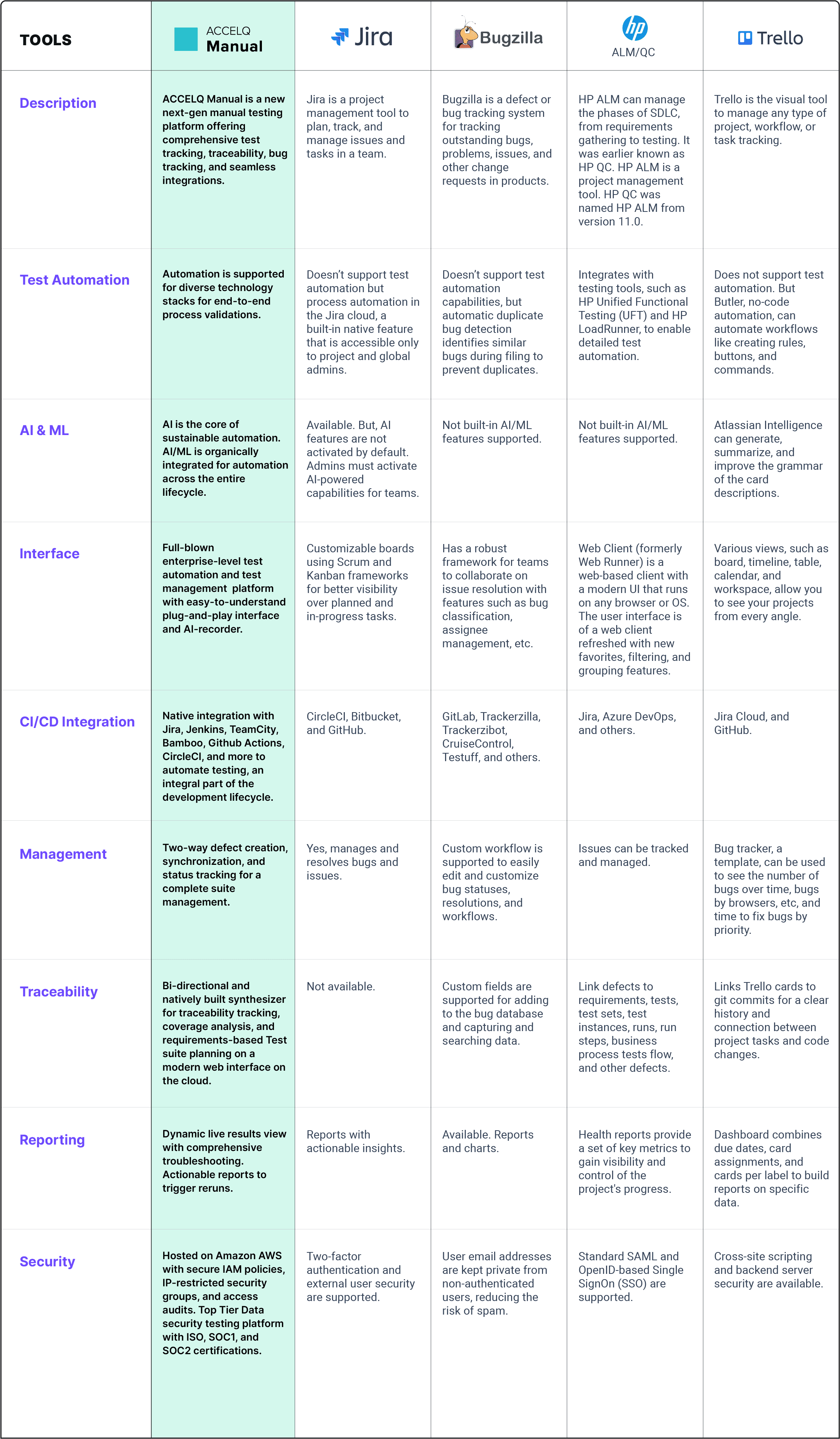
A good bug tracking tool organizes the software testing process with reporting, prioritizing, and documenting fixing bugs, as noted by DeviQA’s engineers in their 2026 review of top tools. It’s about moving beyond simply knowing there’s a problem to actively managing the solution.
Linear: speed and simplicity
Linear is built around a core philosophy: speed. It’s designed for developers who want a minimal, distraction-free environment. The interface is remarkably clean, and the emphasis is on keyboard navigation. If you spend your day in the terminal, you’ll feel right at home. It’s a deliberate departure from the more visually cluttered interfaces of some other tools.
Issue organization in Linear is straightforward. Issues are grouped into "Teams’ and then further organized using ‘Cycles" – time-boxed periods for focused work. This cyclical approach encourages prioritization and helps teams stay on track. Linear also offers powerful automation features, allowing you to automate repetitive tasks and streamline your workflow.
One of Linear’s strengths is its ability to quickly create and assign issues. The keyboard shortcuts are incredibly efficient, and the search functionality is top-notch. It’s genuinely fast – a feeling that’s hard to quantify but immediately noticeable. It’s the kind of tool that gets out of your way and lets you focus on coding.
However, Linear’s simplicity can also be a limitation. It’s potentially lacking features that non-technical stakeholders might need, such as extensive reporting or complex project management views. Its workflows, while effective, are less flexible than those offered by Jira. This isn't necessarily a drawback, but it's something to consider if you need a highly customizable system.
Jira: the enterprise standard
Jira is the default choice for most large companies. TestGrid’s 2026 analysis confirms it still holds the largest market share, mostly because it tries to be everything to everyone, from a simple bug tracker to a full-scale project management suite.
Jira’s extensive feature set is its biggest selling point. It offers customizable workflows, detailed reporting, and a wide range of integrations with other Atlassian products like Confluence and Bitbucket. This integration is seamless and can significantly improve collaboration within teams already invested in the Atlassian ecosystem.
You can tailor Jira to fit almost any process. Custom fields allow you to track specific data points relevant to your project, and the workflow engine lets you define complex issue states and transitions. This level of customization is incredibly powerful, but it also contributes to Jira’s complexity.
That complexity is a major drawback. Jira has a steep learning curve, and it’s easy to get lost in its myriad of features. It can be especially overwhelming for smaller teams who don’t need all that functionality. It’s also possible to over-customize Jira, creating a bloated system that’s difficult to maintain. I think Jira can be a bit much for small teams.
Jira is built for documentation. If you need to track fifty different data points for a single ticket, Jira handles that better than the more minimalist competitors.
- Customizable workflows for defining issue states and transitions.
- Detailed reporting to track progress and find bottlenecks.
- Native connections with Confluence and Bitbucket.
Bug Tracking Tool Comparison: Linear vs. Jira vs. Monday.com (2026)
| Criteria | Linear | Jira | Monday.com |
|---|---|---|---|
| Ease of Use | High - Intuitive interface, fast navigation | Medium - Steeper learning curve, complex configuration | High - Visually appealing, drag-and-drop functionality |
| Scalability | Medium - Well-suited for growing teams, but may have limits at enterprise scale | High - Designed for large organizations and complex projects | Medium - Scalable, but can become unwieldy with extremely complex workflows |
| Workflow Customization | Medium - Flexible, but with a focus on streamlined, developer-centric workflows | High - Extremely customizable, supports a wide range of methodologies | Medium - Customizable, but geared towards broader project management |
| Reporting | Medium - Focus on key metrics, basic reporting features | High - Robust reporting capabilities, advanced analytics | Medium - Visual reporting, but may lack depth for detailed bug analysis |
| Integrations | Medium - Growing integrations, strong focus on developer tools | High - Extensive integrations with Atlassian suite and third-party apps | Medium - Wide range of integrations, particularly for marketing and sales |
| Target Team Size | Small to Medium (10-100) | Medium to Enterprise (50+) | Small to Medium (10-50) |
Qualitative comparison based on the article research brief. Confirm current product details in the official docs before making implementation choices.
Monday.com: visual collaboration
Monday.com takes a different approach to bug tracking, focusing on visual collaboration and ease of use. Its board-based interface is intuitive and promotes transparency, making it easy for everyone on the team to see the status of issues. The emphasis is on creating a shared understanding of the project.
The visual nature of Monday.com makes it particularly well-suited for non-technical users. It’s easy to create boards, assign tasks, and track progress without needing to understand complex workflows or technical jargon. This can be a significant advantage for cross-functional teams.
Monday.com also offers powerful automation capabilities, allowing you to automate repetitive tasks and streamline your workflow. These automations can be triggered by various events, such as issue creation or status updates. It's a flexible system and very easy to pick up.
However, Monday.com isn’t solely focused on bug tracking. It’s a more general-purpose work management tool, which means it might not have all the specialized features that some developers need. With large projects, the visual boards can become cluttered, making it difficult to find specific information. I've found Monday.com to be great for cross-functional teams where everyone needs visibility.
How the workflows actually differ
The way each tool handles bug tracking workflows is a key differentiator. In Linear, issue creation is streamlined, assignment is direct, and prioritization is managed through Cycles. Status updates are quick and easy, and resolution is straightforward. It’s a very linear process – hence the name.
Jira, on the other hand, offers a far more configurable workflow. You can define custom issue types, statuses, and transitions to match your specific process. This flexibility is powerful, but it also requires more setup and maintenance. Jira supports various methodologies, including Agile, Scrum, and Kanban, allowing you to tailor the workflow to your preferred approach.
Monday.com’s workflow is visually driven. Issues are represented as cards on a board, and you move them through different columns to represent their status. This makes it easy to see the overall progress of the project at a glance. While Monday.com offers automation, it's not as deeply integrated into the workflow as in Jira or Linear.
The level of customization available varies significantly. Linear offers the least customization, focusing on a streamlined, opinionated workflow. Jira offers the most, allowing you to tailor almost every aspect of the process. Monday.com falls somewhere in between, offering a balance of flexibility and ease of use. I'm not sure which workflow is 'best' – it depends entirely on the team and the project.
Pricing and value
As of late 2026, pricing varies significantly between the three tools. Linear offers a free plan for personal use and paid plans starting around $8 per user per month. Monday.com offers a range of plans, starting with a free plan for basic use and paid plans ranging from $9 to $19 per user per month.
Jira’s pricing is more complex, with different plans for different use cases. Jira Software starts around $8 per user per month, but the price can increase significantly depending on the number of users and the features required. It's important to carefully evaluate your needs before choosing a plan.
Determining the overall value proposition requires considering the features, ease of use, and scalability of each tool. Linear offers the best value for teams that prioritize speed and simplicity. Jira offers the most comprehensive set of features, but it comes at a cost in terms of complexity and price.
Monday.com provides a good balance between features and ease of use, making it a good choice for teams that need a visual and collaborative bug tracking system. It's difficult to declare a clear 'winner' in terms of pricing, as the best option depends on your specific needs and budget. I’ll avoid making definitive statements about which is 'cheapest' – pricing changes frequently.
Boost Your Development Workflow: Essential Gear for Bug Tracking Success

Comprehensive guide to Agile principles · Covers Scrum, Kanban, and other methodologies · Essential for teams adopting Agile practices
This guide is your go-to resource for understanding and implementing Agile methodologies, which are crucial for effective bug tracking.

Ergonomic split keyboard design · Integrated wrist rest for comfort · Wireless connectivity via Bluetooth or USB
Boost your comfort and productivity during long bug-tracking sessions with this ergonomic keyboard designed for natural typing.

Hybrid Active Noise Cancelling · 40-hour playtime with ANC · Hi-Res Audio with customizable EQ
Minimize distractions and immerse yourself in your work with these noise-cancelling headphones, perfect for focused bug analysis.

Electric height adjustment · Large 55 x 24-inch surface · Memory presets for preferred heights
Stay energized and organized by easily switching between sitting and standing with this spacious, adjustable desk.
As an Amazon Associate I earn from qualifying purchases. Prices may vary.


No comments yet. Be the first to share your thoughts!