The state of quantum development
Quantum computing has moved past pure theory. If you're writing algorithms now, you need a stable environment to test them. Picking an IDE isn't just about preference anymore; it's about which stack actually supports the hardware you want to hit.
The challenges are unique. Quantum programming isn’t like traditional software development. Concepts like superposition and entanglement require a different mindset, and debugging quantum code is a whole new level of complexity. It’s not enough to have a powerful IDE; it needs to understand the fundamentals of quantum mechanics.
As the field grows, we’re seeing a rise in specialized tools designed to handle these challenges. These tools aim to simplify the development process, provide better debugging capabilities, and ultimately, accelerate the journey from idea to working quantum application. The sheer number of options available can be daunting, so let’s look at some of the best options as we head into 2026.
Qiskit for open-source projects
IBM’s Qiskit is currently the dominant force in the quantum software space. One major reason is its active and helpful community. When you run into problems, there’s a good chance someone else has already faced—and solved—it. This is especially valuable in a rapidly evolving field like quantum computing.
Qiskit is a modular collection. Terra handles the core circuits, while Aer acts as the simulator for local testing. Ignis manages error mitigation, which is necessary when dealing with the noise levels of current hardware.
The learning curve for Qiskit is relatively gentle, especially with IBM’s extensive documentation and tutorials. Plus, Qiskit gives you direct access to IBM’s quantum hardware, which is a huge advantage. You can experiment with real machines, albeit with limitations on access and queue times.
However, Qiskit isn’t perfect. Advanced features can get complex, and managing larger quantum circuits can become challenging. While the open-source nature is a strength, it also means staying up-to-date with the latest versions and potential breaking changes requires effort. But overall, it's a solid choice for beginners and experienced quantum developers alike.
Azure Quantum and Q# flexibility
Microsoft takes a different approach with Azure Quantum and the Q# programming language. Instead of focusing on a single hardware provider, Azure Quantum aims to be a multi-vendor platform. This means you can write Q# code and run it on hardware from various companies—IonQ, Quantinuum, and Rigetti, to name a few.
The primary benefit of this approach is avoiding vendor lock-in. You’re not tied to IBM’s hardware or ecosystem. You can choose the best hardware for your specific application and easily switch between providers as technology evolves. Q# integrates seamlessly with Azure Quantum, making it easy to deploy and manage your quantum programs.
Here's a quick look at some of the hardware providers accessible through Azure Quantum:
The question is, is this flexibility actually useful? For now, the differences between hardware providers are subtle for many applications. But as the field matures, we’ll likely see more significant variations in performance and capabilities. Then, Azure Quantum’s multi-vendor approach will become a major advantage.
- IonQ uses trapped-ion systems known for high fidelity.
- Quantinuum: Combining trapped-ion and superconducting qubit technologies.
- Rigetti: Superconducting qubit processors with a focus on scalability.
Qiskit vs. Azure Quantum/Q# for Quantum Development (2026)
| Criterion | Qiskit | Azure Quantum/Q# | Notes |
|---|---|---|---|
| Hardware Access 💻 | High | Medium | Qiskit provides direct access to IBM's quantum hardware. Azure Quantum offers access to multiple providers, but with an abstraction layer. |
| Language Learning Curve 📚 | Medium | Medium | Both Qiskit (Python-based) and Q# have a moderate learning curve, particularly for those unfamiliar with quantum concepts. |
| Community Support 🧑💻 | High | Medium | Qiskit boasts a large and active community, with extensive documentation and tutorials. Azure Quantum's community is growing, but currently smaller. |
| Vendor Lock-in Risk 🔒 | Low | High | Qiskit is open-source, minimizing lock-in. Azure Quantum, while multi-vendor, is tied to the Microsoft ecosystem. |
| Integration with Existing Tools ⚙️ | Medium | Medium | Qiskit integrates well with standard Python data science tools. Azure Quantum integrates with other Azure services and .NET languages. |
| Debugging Capabilities 🐞 | Medium | Medium | Both platforms offer debugging tools, but quantum debugging is generally challenging. Qiskit benefits from Python's established debugging ecosystem. |
| Transpiling Performance 🚀 | High | Medium | Qiskit offers 83x faster transpiling performance compared to some alternatives (as of 2026). Azure Quantum performance depends on the chosen backend. |
Illustrative comparison based on the article research brief. Verify current pricing, limits, and product details in the official docs before relying on it.
Alternative Platforms: Cirq, Braket, & Forest
While Qiskit and Azure Quantum are the clear frontrunners, other platforms deserve a mention. Google’s Cirq is a popular choice for researchers and developers working with superconducting qubits. It's known for its flexibility and control over low-level hardware details.
Amazon Braket provides access to a variety of quantum hardware backends, similar to Azure Quantum, but with a strong integration with other AWS services. It’s a good option if you’re already heavily invested in the AWS ecosystem.
Finally, Rigetti’s Forest offers a complete quantum computing stack, including hardware, software, and cloud services. It’s a solid option, especially if you’re interested in exploring Rigetti’s unique superconducting qubit architecture. Each platform has its strengths, but Qiskit and Azure Quantum currently offer the most comprehensive tools and community support.
Setting Up Qiskit: A Step-by-Step Guide
To get Qiskit running, start with a clean Python environment. Anaconda is the easiest way to manage these packages. Grab the installer from the official site.
Once Anaconda is installed, create a new environment specifically for Qiskit. Open your terminal or Anaconda Prompt and run: `conda create -n qiskit python=3.9`. Then, activate the environment: `conda activate qiskit`. Using a dedicated environment keeps your Qiskit dependencies separate from other projects.
Now, install Qiskit and its dependencies: `pip install qiskit`. This will download and install all the necessary packages. You might encounter issues with specific versions, so refer to the official Qiskit documentation () for the latest instructions.
Let’s test it out with a simple "Hello World" quantum circuit. Create a new Python file (e.g., `hello_quantum.py`) and paste the following code: `from qiskit import QuantumCircuit, execute, Aer circuit = QuantumCircuit(1, 1) circuit.h(0) circuit.measure([0], [0]) simulator = Aer.get_backend('qasm_simulator') job = execute(circuit, simulator, shots=1024) result = job.result() counts = result.get_counts(circuit) print(counts)`. Run the script: `python hello_quantum.py`. If everything is set up correctly, you should see output showing the measurement counts, roughly 50/50.
- Download and install Anaconda.
- Create a new environment: `conda create -n qiskit python=3.9`
- Activate the environment: `conda activate qiskit`
- Install Qiskit: `pip install qiskit`
- Run the 'Hello World' example.
Debugging Q# and Qiskit: Common Pitfalls
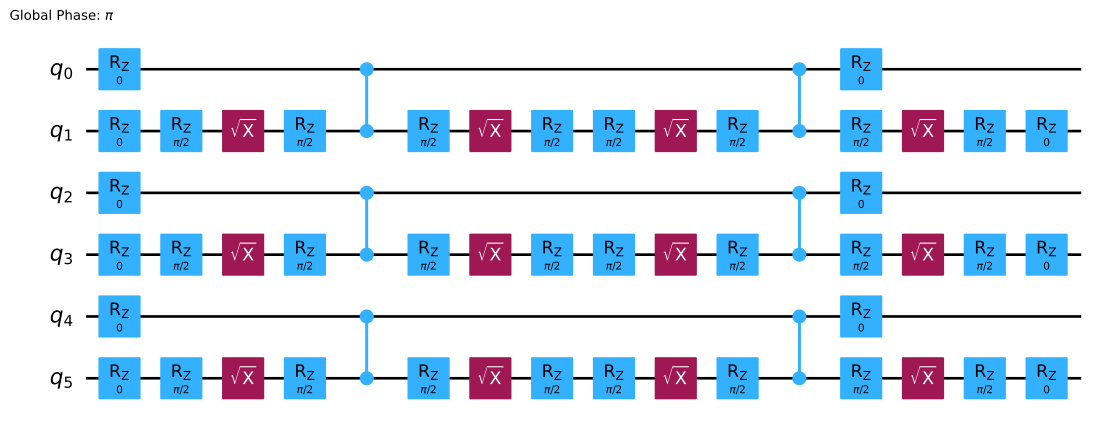
Debugging quantum code is… different. Traditional debugging techniques don’t always apply. In Qiskit, error messages can be cryptic, and understanding the root cause of a bug often requires a deep understanding of quantum mechanics. Start by carefully reviewing your circuit diagrams and ensuring your quantum gates are applied in the correct order.
A common mistake is incorrect qubit indexing. Remember that qubits are zero-indexed, so the first qubit is 0, the second is 1, and so on. Another frequent issue is improperly handling measurement results. Make sure you’re interpreting the counts correctly and understanding the probabilities involved.
Q# debugging in Azure Quantum benefits from the standard Visual Studio debugging tools, but the underlying quantum concepts remain challenging. Pay close attention to the types of quantum data you’re using and ensure they are compatible with the operations you’re performing.
Unfortunately, current debugging tools are limited. We’re still in the early days of quantum computing, and the tooling hasn’t caught up with the complexity of the algorithms. A lot of debugging still relies on careful code review, simulation, and a healthy dose of intuition. I've spent hours tracking down bugs caused by seemingly minor errors in circuit construction.
- Qiskit often returns cryptic error messages or fails due to zero-indexed qubit confusion.
- Q#: Type mismatches, incorrect quantum data usage, reliance on simulation for debugging.
IDE Integration & Extensions
For Qiskit development, Visual Studio Code (VS Code) is a popular choice. It’s lightweight, customizable, and has excellent Python support. Install the Python extension for syntax highlighting, code completion, and debugging. Jupyter Notebooks are also widely used, especially for experimentation and visualization.
For Q# development in Azure Quantum, Visual Studio is the natural choice. It provides seamless integration with Azure services and includes a dedicated Q# extension with debugging tools. The Q# extension offers features like syntax highlighting, IntelliSense, and the ability to step through your code.
I personally prefer VS Code for Qiskit because of its speed and flexibility. The Python extension is excellent, and I can easily switch between different projects. For Q#, Visual Studio is the way to go—the integration with Azure Quantum is invaluable. There are also extensions available for linting and code formatting, which can help improve code quality.
Gear Up for Quantum: Essential Hardware for Your Qiskit & Q# Journey

Intel Core i7-13700H processor · 32GB RAM · 1TB PCIe SSD
This high-performance laptop provides ample power and memory for running demanding quantum simulations and coding tasks smoothly.

27-inch 4K UHD (3840x2160) resolution · HDR10 support · IPS panel for wide viewing angles
Experience crystal-clear visuals and vibrant colors on this large 4K monitor, perfect for detailed code and complex quantum circuit diagrams.
![Perixx PERIBOARD-535BR [Firmware Updated] Wired Ergonomic Mechanical Keyboard - Full-Size - Low-Profile Brown Tactile Switches - NKRO Anti-Ghosting - Compatible with Windows and macOS](https://m.media-amazon.com/images/I/71d5v14gj8L._AC_UY654_QL65_.jpg)
Low-profile brown tactile mechanical switches · Full-size layout · NKRO and anti-ghosting
Enjoy a comfortable and responsive typing experience with this ergonomic mechanical keyboard, designed for long coding sessions.

Advanced active noise cancellation · Wireless Bluetooth connectivity · Up to 24 hours of playtime
Immerse yourself in your work without distractions thanks to these noise-cancelling headphones, ideal for focused quantum development.

8K DPI sensor for precise tracking · Ultra-fast scrolling · Ergonomic design
Navigate your development environment with precision and comfort using this advanced wireless mouse, featuring customizable buttons and smooth scrolling.
As an Amazon Associate I earn from qualifying purchases. Prices may vary.


No comments yet. Be the first to share your thoughts!