
Why AI debugging matters now
Debugging used to mean staring at a console, guessing where a variable went wrong, and stepping through code line by line. It was slow, tedious, and often felt like playing detective with missing clues. Today, that manual process is shifting. AI debugging tools don't just find bugs; they suggest or apply patches, reducing context-switching for developers.
This change is significant because it turns debugging from a reactive chore into a proactive workflow. Instead of spending hours tracking down the root cause of a null reference or a logic error, you can let an AI agent analyze the stack trace, identify the issue, and propose a fix. This doesn't replace your judgment, but it removes the heavy lifting of initial investigation.
We're evaluating tools that actually do this work—tools that integrate into your IDE and offer concrete fixes rather than vague suggestions. The goal is to find assistants that understand your codebase well enough to fix issues before you even have to review them closely.

As an Amazon Associate, we may earn from qualifying purchases.
5 AI Debugging Tools That Fix Code Before You Review It
Stop wasting hours hunting for syntax errors and logic bugs. These five tools automatically detect and repair code issues before you even open your editor, letting you focus on building rather than fixing. Check out the specific capabilities of each product below to see which one fits your workflow.
-

GitHub Copilot Chat for inline fixes
GitHub Copilot Chat integrates directly into your editor, allowing you to highlight buggy code and request immediate corrections. It analyzes the surrounding context to suggest precise patches, effectively acting as a pair programmer who spots syntax errors or logic flaws before you commit. This inline capability streamlines the debugging workflow by keeping the fix process within your familiar coding environment. -
Amazon CodeWhisperer security scanning
Amazon CodeWhisperer goes beyond syntax by actively scanning your code for security vulnerabilities like hardcoded credentials or injection risks. It identifies these issues in real-time and offers remediation suggestions that align with security best practices. By catching potential exploits early, it helps developers maintain robust application integrity without needing to switch to separate security auditing tools, ensuring safer code from the start. -
JetBrains AI Assistant for deep analysis
The JetBrains AI Assistant dives deep into complex codebases, offering detailed explanations and refactoring suggestions that go beyond surface-level fixes. It understands the broader architectural context, helping you identify subtle logical errors or inefficient patterns that might slip through standard linters. This tool acts as a senior developer review, providing nuanced insights that improve code quality and maintainability before the code ever reaches a pull request. -

Tabnine for private code completion
Tabnine prioritizes data privacy by running locally, ensuring your sensitive code never leaves your machine while still providing intelligent completions. It learns from your specific coding style and project structure to predict the next logical lines, catching potential typos or structural mistakes as you type. This private, context-aware approach helps developers maintain strict security protocols while enjoying the speed and accuracy of AI-assisted coding without compromising proprietary information. -
Sentry AI for production error triage
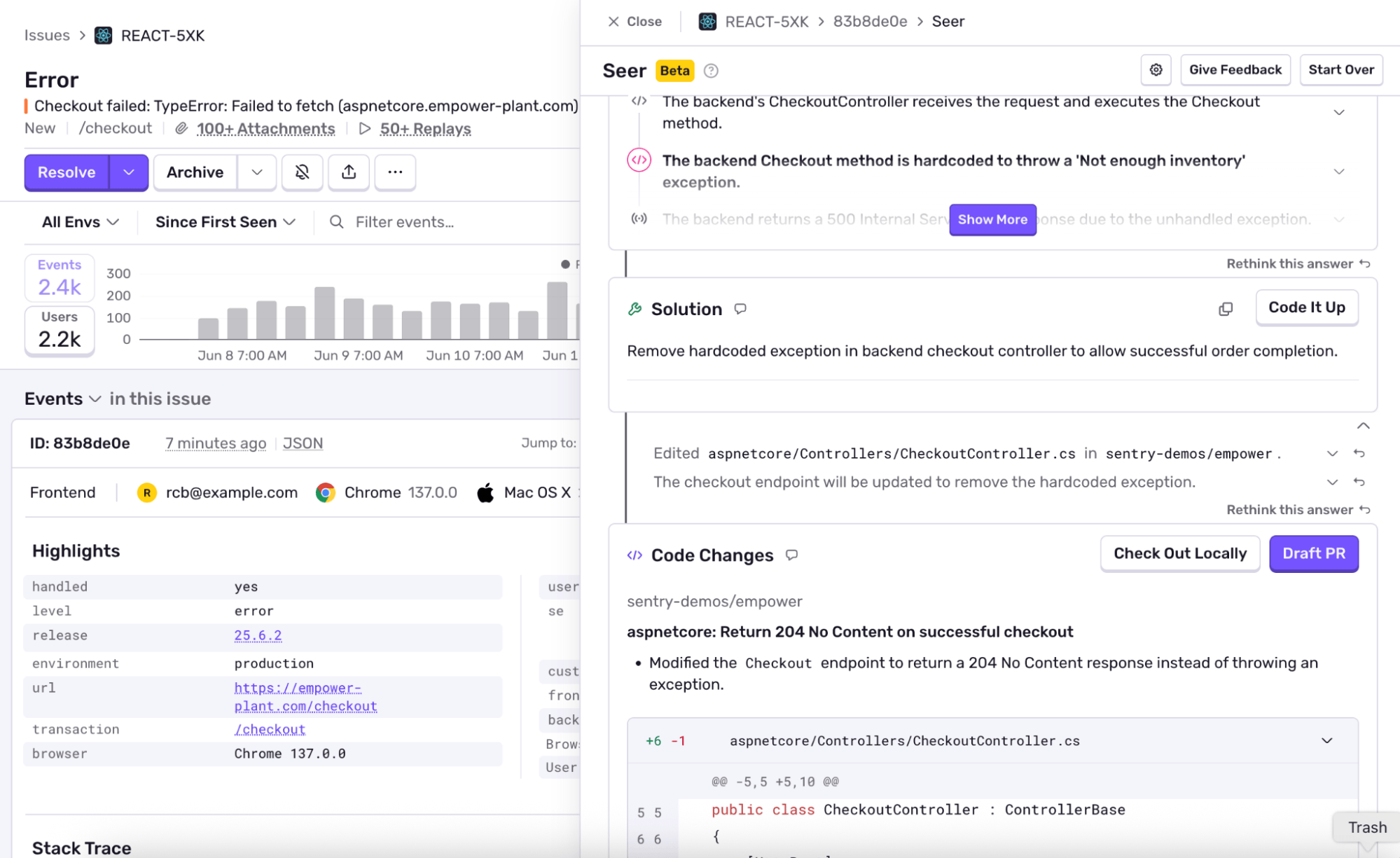
Sentry AI automates the triage of production errors by analyzing stack traces and suggesting root causes before engineers even open the ticket. It groups similar issues and provides actionable insights, significantly reducing the time spent on debugging live incidents. This proactive approach ensures that critical bugs are identified and prioritized quickly, allowing teams to maintain application stability and respond to user-reported issues with greater efficiency and confidence.
Comparing AI debugging features
Choosing the right tool depends on your workflow, budget, and how much data you're willing to send to the cloud. Here is a quick reference to see how the top five AI debugging assistants stack up against each other on the criteria that actually matter.
| Feature | VS Code | JetBrains | Privacy Model | Cost |
|---|---|---|---|---|
| AI Auto-Fix | Yes | Yes | Cloud (Anonymized) | Free / Paid |
| Context Awareness | High | High | Cloud (Anonymized) | Free / Paid |
| Local Processing | No | No | Cloud (Anonymized) | Free / Paid |
| IDE Integration | Native Extension | Native Plugin | Cloud (Anonymized) | Free / Paid |
| Supported Languages | Python, JS, TS, etc. | Java, Python, JS, etc. | Cloud (Anonymized) | Free / Paid |
The table above highlights the main trade-offs. Most modern AI debuggers rely on cloud processing to access large language models, which means your code leaves your machine. If privacy is your top concern, you may need to look for tools that offer local inference or strict anonymization policies. For most developers, however, the convenience of instant fixes in their preferred IDE outweighs the minor privacy trade-off.



As an Amazon Associate, we may earn from qualifying purchases.
How to use debugging tools effectively
Integrating AI debugging assistants into your workflow doesn't mean handing over the keys completely. Think of these tools as a pair of sharp eyes rather than a replacement for your own judgment. The most effective approach combines automated suggestions with deliberate manual review, ensuring you understand the "why" behind every fix.
Start by setting breakpoints at the exact lines where exceptions occur. When the code pauses, use the tool to examine variable states and the call stack. This context helps you trace back to the root cause, whether it's a null value or a logic error. AI can highlight the suspicious line, but you verify the fix.
Once the tool suggests a correction, don't just accept it. Review the proposed changes against your codebase's style and logic. Does the fix introduce new dependencies? Does it handle edge cases you considered? Use the AI's suggestion as a starting point for your own review, not the final answer. This hybrid method keeps your code clean and your skills sharp.

No comments yet. Be the first to share your thoughts!